

Participant
February 25, 2020
Question

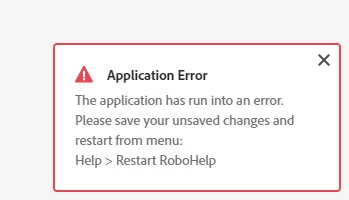
Application Error - Restart Robohelp

  • February 25, 2020
  • 26 replies
  • 1713 views

Hello, 


I keep getting this application error (see attachment) but it's not telling me what is causing the error. Is there anyone who knows about this and has input? 
 

This topic has been closed for replies.

26 replies

Peter Grainge
Community Expert
Community Expert
August 9, 2021

RoboHelp is still not happy with your CSS.

________________________________________________________
See www.grainge.org for free Authoring and RoboHelp Information

Use the menu (bottom right) to mark the Best Answer or Highlight particularly useful replies. Found the answer elsewhere? Share it here.
Inspiring
August 9, 2021

Unfortunately, I did get the error, but only once.  So I restarted and starting working again and noticed that (none) displays in the Properties Styles tab.  The correct Style Sheet is selected in the Topic properties. The topic appears correctly.  When I try to open the Stylesheet, it opens with the error "Failed to parse the stylesheet".  

Peter Grainge
Community Expert
Community Expert
August 4, 2021

Fingers crossed that has fixed the problem.

________________________________________________________
See www.grainge.org for free Authoring and RoboHelp Information

Use the menu (bottom right) to mark the Best Answer or Highlight particularly useful replies. Found the answer elsewhere? Share it here.
Inspiring
August 4, 2021

Peter,

I backed up the project and deleted the .rh folder.  The .css file has been around for many years and used in older projects. I created a copy of the .css file, opened it in Robohelp and removed the kadov styles.  So far, I  have not seen the application error when using the new .css.


Peter Grainge
Community Expert
Community Expert
August 3, 2021

Let me correct that as you have posted, the New label is misleading.

________________________________________________________
See www.grainge.org for free Authoring and RoboHelp Information

Use the menu (bottom right) to mark the Best Answer or Highlight particularly useful replies. Found the answer elsewhere? Share it here.
Peter Grainge
Community Expert
Community Expert
August 3, 2021

10 times is far from normal so then it is a case of is it the same operation or multiple operations? My own experience and from helping here is that it is one thing that is not being fixed and if you don't fix it, then it will keep recurring.


It doesn't look like you have posted an issue so start another thread and we'll see if we can find the cause.

________________________________________________________
See www.grainge.org for free Authoring and RoboHelp Information

Use the menu (bottom right) to mark the Best Answer or Highlight particularly useful replies. Found the answer elsewhere? Share it here.
Peter Grainge
Community Expert
Community Expert
August 3, 2021

@nataliej34516288 I haven't been able to break the project. You mentioned "tagging content" so I tried applying different styles to paragraphs but that worked fine.


When a new user works on a project a new file is created in the .rh folder so something in your files in that folder could be the issue. Deleting the files and then reopening the project will create a clean file so try that first. You will lose custom colours and tag groups (not the tags) but you can restore those by opening the corrupt file and the new file in a text editor. In your case it looks like only custom colours will be lost.


As you mentioned applying styles, I am also wondering about your CSS. It clearly dates back to an old version of RoboHelp as it contains the infamous Kadov tags. If deleting the .rh folder contents does not fix things, I would look at building a new CSS file in 2019.


If you have a subscription licence rather than a perpetual licence I would also upgrade to 2020.


You also need to take a look at the Reports as there are a number of broken links amongst other issues. I don't think any of them are relevant to the problem though, just some housekeeping.


Let us know if that helps.

________________________________________________________
See www.grainge.org for free Authoring and RoboHelp Information


Use the menu (bottom right) to mark the Best Answer or Highlight particularly useful replies. Found the answer elsewhere? Share it here.
Peter Grainge
Community Expert
Community Expert
August 3, 2021

Anyway, if the product has a shortcut to restart it tells me a lot.

@AndreyGl Are you saying that you seeing a built in restart as a sign there is something wrong with the product? I believe it is there to help flush a few things on exit. The issue may be a product issue or it can be some external corruption.

________________________________________________________
See www.grainge.org for free Authoring and RoboHelp Information

Use the menu (bottom right) to mark the Best Answer or Highlight particularly useful replies. Found the answer elsewhere? Share it here.
Known Participant
August 3, 2021

I'm sorry Peter,
We may have different points of view on this situation, but when I see such a message more than 10 times a day, this isn't a sign of normal product operation, but rather indicates that the number of bugs in it is very large.
The first keyboard shortcut I learned for this product was "Alt-Ctrl-R"))).

Known Participant
August 3, 2021

This message appears from time to time during operation. Sometimes the reason is obvious, sometimes not. Anyway, if the product has a shortcut to restart it tells me a lot.

Peter Grainge
Community Expert
Community Expert
August 2, 2021

Meantime try deleting the contents of the .rh folder. Backup the project first.

________________________________________________________
See www.grainge.org for free Authoring and RoboHelp Information

Use the menu (bottom right) to mark the Best Answer or Highlight particularly useful replies. Found the answer elsewhere? Share it here.
