

Participant
February 25, 2020
Question

Application Error - Restart Robohelp

  • February 25, 2020
  • 26 replies
  • 1713 views

Hello, 


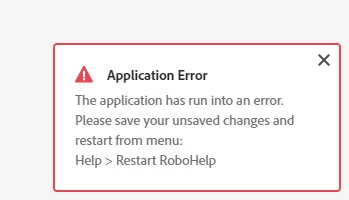
I keep getting this application error (see attachment) but it's not telling me what is causing the error. Is there anyone who knows about this and has input? 
 

This topic has been closed for replies.

26 replies

Peter Grainge
Community Expert
Community Expert
February 26, 2020

if it happened under just one circumstance I would have included that - but it happens at random with no correlation to a specific action


OK but I had no way of knowing your thinking. I can only go on what was posted.


Use the menu (bottom right) to mark the Best Answer or Highlight particularly useful replies. Found the answer elsewhere? Share it here.
Peter Grainge
Community Expert
Community Expert
February 26, 2020

What's rude? I simply stated that no one could help based on just that information. I then suggested what to do first and if it happened again to come back with some more information so that I or someone else could try to help based on what you told us.


Use the menu (bottom right) to mark the Best Answer or Highlight particularly useful replies. Found the answer elsewhere? Share it here.
Jeff_Coatsworth
Community Expert
Community Expert
February 26, 2020

Have you tried to do a series of actions without saving each time?

Participant
February 26, 2020

I have tried that and also tried the same series of actions while saving after each one. There is no direct correlation between this error and any specific action being performed - it happens at random. Many times, after I have restarted Robohelp (as the error states to do) the error will throw again immediately after the restart. 

Community Expert
February 26, 2020

The only error I hate more (from a different application) is "Object reference not set to an instance of an object."


As near as I can tell, they both translate to "Did you try switching it off and on again? Yes? Okay, try thumping it a few times".

Peter Grainge
Community Expert
Community Expert
February 25, 2020

Nobody can help with just that information. What you need to do follow the instructions and then repeat what you were doing when the error occurred. If it then happens again, post back with information about what you are trying to do. Then hopefully someone can help.


Use the menu (bottom right) to mark the Best Answer or Highlight particularly useful replies. Found the answer elsewhere? Share it here.
Participant
February 26, 2020

No need to be rude; if it happened under just one circumstance I would have included that - but it happens at random with no correlation to a specific action. 

Jeff_Coatsworth
Community Expert
Community Expert
February 25, 2020

What version of RH are you running? Classic or New UI (RH2019)? Are you all patched up? Check Help > Updates to check.

Participant
February 26, 2020

I'm running RH2019 and it's all patched up.
