Known Participant
July 26, 2023
Answered

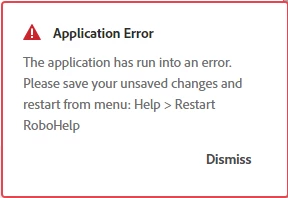
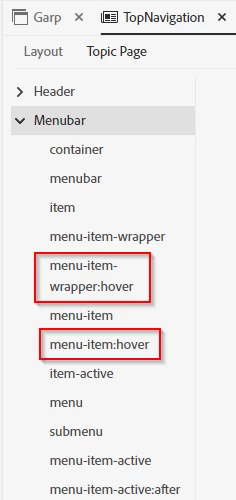
Application Error when clicking on menu-item-wrapper:hover and menu-item:hover

  • July 26, 2023
  • 2 replies
  • 190 views

Hi!

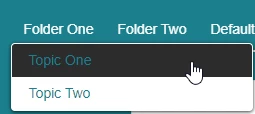
Wanted to see if anybody else has seen this problem, when clicking on menu-item-wrapper:hover and menu-item:hover in Topic page Menubar, I always recieve an Application Error. And it´s only on these two, everything else works. We would like to change the color from black to something else. 

I´ve also added pictures, maybe someone have a tip for us?


Thanks!

Best regards

Thatsawan Bientini

    This topic has been closed for replies.
    Correct answer Peter Grainge

    You haven't said which version of RoboHelp you are using. Please always start a thread with this information.

    • Please go to Help > About and include the full version number.
    • If you are using 2019 also state whether it is 2019 Classic or 2019 New UI.


    I'm pretty sure it is a known issue in 2022 that is due to be fixed in an update due soon.

    ________________________________________________________

    My site www.grainge.org includes many free Authoring and RoboHelp resources that may be of help.


    2 replies

    Known Participant
    July 26, 2023

    Hi again!

    Sorry we are working in Version 2022.1.188

    Good to know that this issue will be solved soon 🙂 Do we get an update or do we have to look for this ourselves?

    Peter Grainge
    Community Expert
    Peter GraingeCommunity ExpertCorrect answer
    Community Expert
    July 26, 2023

    You haven't said which version of RoboHelp you are using. Please always start a thread with this information.

    • Please go to Help > About and include the full version number.
    • If you are using 2019 also state whether it is 2019 Classic or 2019 New UI.


    I'm pretty sure it is a known issue in 2022 that is due to be fixed in an update due soon.

    ________________________________________________________

    My site www.grainge.org includes many free Authoring and RoboHelp resources that may be of help.


    Use menu (bottom right) to mark as Best Answer or to Highlight particularly useful replies. Found the answer elsewhere? Share it here.
    Peter Grainge
    Community Expert
    Community Expert
    July 26, 2023

    It is announced on the forum so check there. Update 2 is already released but Check for Updates does not work from your Update 1 because of a bug. How to upgrade to that is covered on the forum. However, the upgrade to Update 3 should work.

    ________________________________________________________

    My site www.grainge.org includes many free Authoring and RoboHelp resources that may be of help.


    Use menu (bottom right) to mark as Best Answer or to Highlight particularly useful replies. Found the answer elsewhere? Share it here.