



defaultntfl65knte3g
Known Participant
August 31, 2021
Question

Applying Conditional Tags Indents Text in Table

  • August 31, 2021
  • 2 replies
  • 102 views

I'm working with RH Classic 19 (14.0.14.002)

I've created a table with 2 columns and 10 rows and then generated it - all is well.
However, if I apply a conditional tag to a row and then generated it - all is not well.
The text that I applied a conditional tag to is now indented and not aligned with the rest of the columns.
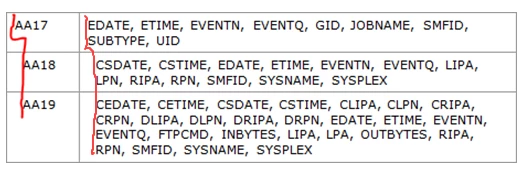
How do I get rid of these indented spaces after applying the tags?

    This topic has been closed for replies.

    2 replies

    Community Expert
    September 1, 2021

    Can you post the code of the output for a "good" row and a "bad" row?


    Also, click inside one of the "bad" rows, open the browser developer tools and take a screenshot of the window. That might help us figure out what's going on.

    defaultntfl65knte3g
    Known Participant
    August 31, 2021

    Any suggestions on how to fix this?