


Inspiring
October 21, 2024
Answered

Are we supposed to format images for them to show up as Home Page Tiles?

  • October 21, 2024
  • 2 replies
  • 467 views

2022.4.179


How do I control Tile images?

I want this simple image, green chevrons, to be turned into a thumbnail for the Home Page tiles.

 

However, when I view the page all I get is a green box:
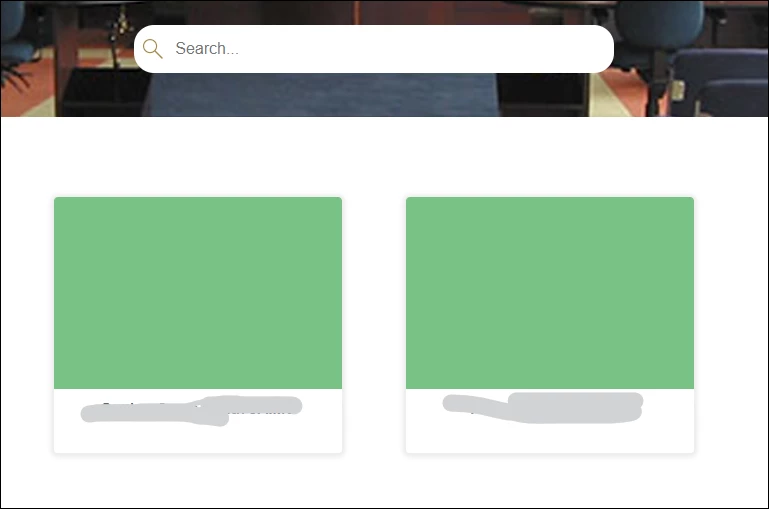
 

I'm controlling my tiles from the TOC and under My Frameless output preset I've selected:

Layout > Use template home page

and under Show Thumbnails for images, I've had no luck when selecting Create Thumbnails for Images OR Style Existing Images as Thumbnails.

Any thoughts?

    This topic has been closed for replies.
    Correct answer TaskWriter

    Here's what I did to resize the images:

    Output > Templates > Template Name > Home Page > TOC Tiles > Image-box >  LAYOUT and adjusted Height in rem units.


    However, what kind of measurement is rem?  I made that smaller and it worked.

    2 replies

    Jeff_Coatsworth
    Community Expert
    Community Expert
    October 21, 2024

    Pretty sure that thumbnail stuff only refers to images inside topics, not on the TOC.

    Peter Grainge
    Community Expert
    Community Expert
    October 21, 2024

    @Jeff_Coatsworth Correct.

    ________________________________________________________

    My site www.grainge.org includes many free Authoring and RoboHelp resources that may be of help.


    Use menu (bottom right) to mark as Best Answer or to Highlight particularly useful replies. Found the answer elsewhere? Share it here.
    Peter Grainge
    Community Expert
    Community Expert
    October 21, 2024

    I haven't done much in customising the images but I think the issue is the shape. Your first image is a rectangle and it looks like the tiles are taking a square from the middle, note the shade of green.


    Both TOC and Homepage images are square by default. You could try resizing the tile box in Home Page > tile-box > layout

    ________________________________________________________

    My site www.grainge.org includes many free Authoring and RoboHelp resources that may be of help.


    Use menu (bottom right) to mark as Best Answer or to Highlight particularly useful replies. Found the answer elsewhere? Share it here.
    Inspiring
    October 21, 2024

    Ah, so it looks like it's working on the aspect ratio of a square, or whatever size is set for the tile box.


    I'll see if I can changethe tile size box ratio and if that doesn't work, then put the chevrons in a white square.


    Thanks Peter!

    TaskWriterAuthorCorrect answer
    Inspiring
    October 23, 2024

    Here's what I did to resize the images:

    Output > Templates > Template Name > Home Page > TOC Tiles > Image-box >  LAYOUT and adjusted Height in rem units.


    However, what kind of measurement is rem?  I made that smaller and it worked.