
Known Participant
October 25, 2023
Question

Assets folder is not loading on the index page

  • October 25, 2023
  • 11 replies
  • 1272 views

Hi,


I am using Robohelp 2022 version.


After the project setup the assets folder is not loading on the index (home) page. Because of which there the fonts and styling is not applied on the index page. 
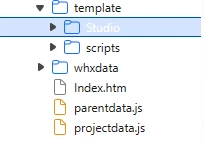


Working fine with the internal topics page 
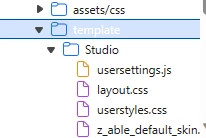


Kindly suggest.


Thank you!

    This topic has been closed for replies.

    11 replies

    Community Expert
    November 2, 2023

    Could you provide details about what change you made to fix the issue? This could help people with the same problem in future.

    Community Expert
    October 31, 2023

    Hold off on trying to get the font right for the skin/template. I may have found an easier way to set it, but I've asked Peter to test it to confirm. 

    Peter Grainge
    Community Expert
    Community Expert
    October 31, 2023

    I will take a look later but two things.


    1. I don't think this is a version issue and am more inclined to it being a set up issue. You way you have the latest and we see people say that because Help > Update says isn't one.. There was a bug so please specify the version. It should be 2022.3
    2.  See https://www.grainge.org/demos/fontawesome/index.htm#t=fontface.htm. You will see the TOC is set up using the @11220649-face method. By comparing that project line by line (download it) you should find your issue. The same structure is important. Subsitute your font for the Quicksand font I have used.

    ________________________________________________________

    My site www.grainge.org includes many free Authoring and RoboHelp resources that may be of help.


    Use menu (bottom right) to mark as Best Answer or to Highlight particularly useful replies. Found the answer elsewhere? Share it here.
    Peter Grainge
    Community Expert
    Community Expert
    October 31, 2023

    Also I notice your code is not the same.

    ________________________________________________________

    My site www.grainge.org includes many free Authoring and RoboHelp resources that may be of help.


    Use menu (bottom right) to mark as Best Answer or to Highlight particularly useful replies. Found the answer elsewhere? Share it here.
    Community Expert
    October 31, 2023

    For the font not working in the skin. If you have set up the font-face in your skin, then the most likely problem is the path to the font is wrong. You will need to adjust it to go back up to to the root of the project and then down into the assets folder. This is relative to the output location, not the source location. (I assume you have also selected the font in the correct location in the skin/template editor in Robohelp.)


    For the topic content not displaying the correct font in your old project. Something is different in how you have set things up. You will need to compare the setup from your new working project with the setup in your old, broken project.

    Community Expert
    October 30, 2023

    Let's just confirm that everything is working in your topics first.


    When you generate, does the topic content use the correct font you have defined?

    Known Participant
    October 30, 2023

    I have created multiple projects. Here, I am facing 2 issues.


    New projects: In the newly created projects the font is not applied on the home page but applied on the inner pages (topics). When get the Output the assets folder shows the fonts folder also.


    Old Project: In one of the old projects the font is not applied on the home page and topics both. When get the Output the assets folder is not showing the fonts folder.


    Known Participant
    October 30, 2023

    New project created on 18th Sep. 2023. 

    Old one was created on 19th July 2023.

    Community Expert
    October 30, 2023

    And you have assigned 'galano' to styles in your stylesheet as well, and you are still not seeing this font in your topics?

    Known Participant
    October 30, 2023

    Yes, I am using the font in the userstyle also.


    Community Expert
    October 30, 2023

    Okay how are you referencing the fonts? You've used @ font-face? Include a small code sample showing how you set this up in your css.


    Known Participant
    October 30, 2023

    Followed https://www.grainge.org/pages/authoring/fonts/fonts.htm 


    Sample Code:

    @11220649-face {
    font-family: 'galano';
    src: url('../fonts/webFonts/GalanoGrotesque-Italic/font.woff2') format('woff2'), url('../fonts/webFonts/GalanoGrotesque-Italic/font.woff') format('woff');
    font-weight: 400;
    font-style: italic;


    Community Expert
    October 29, 2023

    Have you set up your css to reference the fonts? Compare the css in a project that is working, with the one that isn't.

    Known Participant
    October 30, 2023

    Hi Amber,


    I updated the css to the reference fonts and using the same css and userstyle for all the project I created. It was working fine earlier, loading the correct fonts and style.


    Community Expert
    October 26, 2023

    You cannot make changes to the index.htm as this is a file that is generated by RH and contains ONLY code to pull in the skin, topics etc.


    I assume you want to make changes to your skin/template file.


    Any content in the assets folder (in the screenshot that Peter posted) will only affect your topics, not your skin. 


    If you want to make changes to the skin/template, then you need to make those changes in the skin editor. If the item you want to change is not available in the skin editor, you can add css, image, scripts and other files as User Assets section of the skin.  I would only recommend doing this if you have advanced css and scripting knowledge, although we can provide advice if you ask specific questions.


    Also, it's best not to post screenshots of the developer tools, as that doesn't tell us anything about what you are trying to do in Robohelp. I would suggest a screenshot of your output showing what isn't working and what is, along with where you set up things up in Robohelp.

    Known Participant
    October 27, 2023

    Hello,


    I imported the 'Fonts' folder in the assets.


    Image 1.


    Image 2.


    Now, when I get the output the folder is not shown in the output and the font is also not applied.


    Earlier it was working fine for me and I was getting the output correctly.


    What I am getting for the other projects. 


    Kindly sugget.


    Thank you!


    Peter Grainge
    Community Expert
    Community Expert
    October 26, 2023

    In the second image in your first post, is that from the Contents panel? The folder name assets/css should not contain a forward slash and the various assets should be in sub-folders. Also the template folder should not appear in the source.


    With the above folders, the generated output should look like this.


    Note the assets/css folder shows but not the others as they are empty in this project.


    In your first image, the index page is showing in the template folder. That too is wrong. It should be in the root of the output, Frameless in the above image.


    Something is messed up in your project and that probably accounts for the output being wrong. I'm thinking it would pay to create a new project and run some simple tests.


    Forgive me for asking but are you a new user?

    ________________________________________________________

    My site www.grainge.org includes many free Authoring and RoboHelp resources that may be of help.


    Use menu (bottom right) to mark as Best Answer or to Highlight particularly useful replies. Found the answer elsewhere? Share it here.
    Community Expert
    October 26, 2023

    Where is the assets folder you are talking about in RH? What are some examples of items you have added to it? What are some specific examples of what you want to change in your output?


    Known Participant
    October 26, 2023

    I need to change the properties of index.htm page. The theme I am using is Frameless > Studio.


    Jeff_Coatsworth
    Community Expert
    Community Expert
    October 26, 2023

    Ok, keep going - what properties? Maybe post some more screenshots about what you're looking to do.