Answered
Assign a user-script to a button
How can I assign a button to a .jsx for quicker access? Currently I have to use 6 mouseclicks and 3 keyboard strokes!!

How can I assign a button to a .jsx for quicker access? Currently I have to use 6 mouseclicks and 3 keyboard strokes!!
Well...
You actually *CAN* link a toolbar button to a script. 
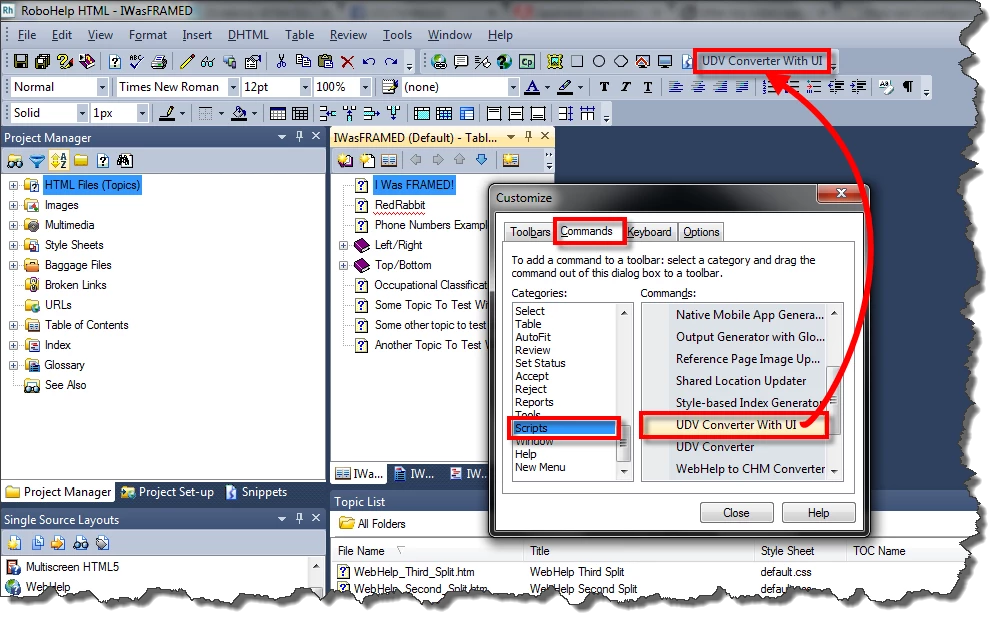
Right-click the toolbars and choose Customize... Then from the Customize dialog, click the Commands tab and find the Scripts item on the left side. Click the script you want and drag it from the dialog to the Toolbar.
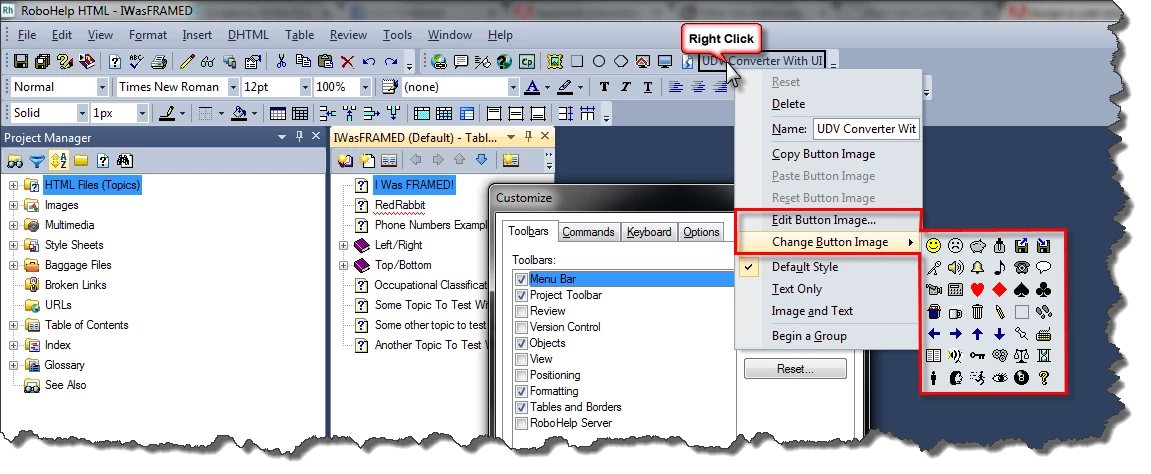
If you want to see an image in the toolbar instead of the script name, right-click the new area in the toolbar and choose an image.
Cheers... Rick 
Well... your description was not helpful at all.. but:
The user script has to be copied to the write protected folder "%programfiles%/abobe/.." where all the other scripts can also be found.
Honestly: this is not user friendly, but it works somehow at least.
Already have an account? Login
Enter your E-mail address. We'll send you an e-mail with instructions to reset your password.


 AdChoices