Participating Frequently
September 28, 2011
Question

Auto Update Not Auto Updating

  • September 28, 2011
  • 1 reply
  • 1331 views

I am trying to enable auto update, but can't coax AIR Help into checking a server location automatically. Manual updating works fine (clicking Check Now), and commenting works. So it's not a network problem. My network folder contains the .air app, the comments.xml file, and the update.xml file.

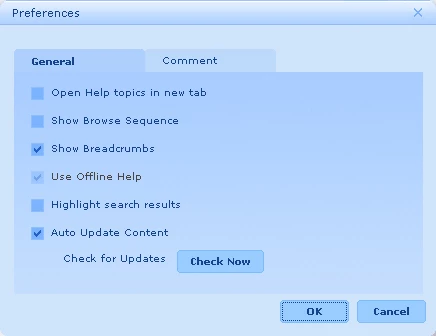
In the Preferences dbox, Use Offline Help is selected and dimmed. How do I clear that and will that solve my auto update problem?
Thanks,

pisces mortem

This topic has been closed for replies.

1 reply

Peter Grainge
Community Expert
Community Expert
September 28, 2011

AUTOUPDATE

Have you put both the XML and AIR file in the update location?

OFFLINE HELP

Look for Show Online Content in the http://www.grainge.org/pages/authoring/air/9/air_rh9.htm page on my site.


See www.grainge.org for RoboHelp and Authoring tips

@petergrainge

Use the menu (bottom right) to mark the Best Answer or Highlight particularly useful replies. Found the answer elsewhere? Share it here.
Participating Frequently
September 28, 2011

Yes, both the AIR and XML files are in the same folder on the network. Manual updating works - if I click Check Now, it updates. It just doesn’t autuomatically look for an update when the Help is launched.

Keri

Jeff_Coatsworth
Community Expert
Community Expert
September 28, 2011

Was the folder specified in the SSL recipe that created the AIRHelp? Did it change between creating the help and trying to update?