Inspiring
June 29, 2022
Answered

automatisch Rahmen im jpg erstellen

  • June 29, 2022
  • 6 replies
  • 497 views

Hi,
ich verwende RP Version 2020.7.46 auf Win 10
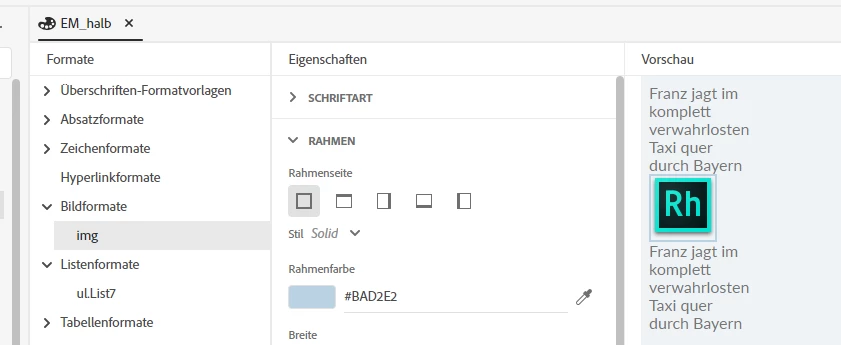
Wie kann eine Formatvorlage für Graphiken erstellen?
Alle jpgs sollen beim Import einen schmalen Rand erhalten.
Der geht leider beim Import aus Word verloren. 
Vielen Dank für die Unterstützung
    This topic has been closed for replies.
    Correct answer Cordula24933232f1e0

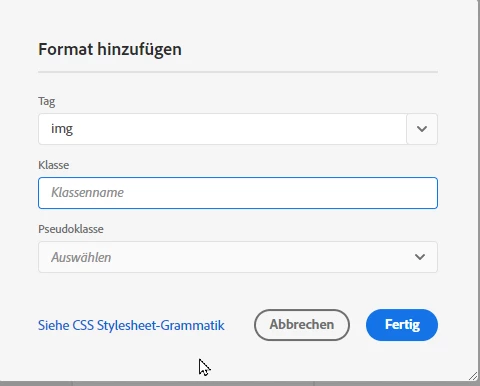
    Wird hier der Rahmen vorgegeben erhält jedes Image bei Ausgabe einen Rahmen.
    NUr das erste Feld ausfüllen und auf Fertig klicken.


    6 replies

    Peter Grainge
    Community Expert
    Community Expert
    July 13, 2022

    A frame is something you can insert into a topic and in it you could put a video, a web page that shows within it. The frame and the content are two different things.


    Images in a topic can have a border around. The border is then part of the image.

    ________________________________________________________

    My site www.grainge.org includes many free Authoring and RoboHelp resources that may be of help.


    Use the menu (bottom right) to mark the Best Answer or Highlight particularly useful replies. Found the answer elsewhere? Share it here.
    Inspiring
    July 13, 2022

    Images in a topic can have a border around. The border is then part of the image.
    Thats what I ment..

    Peter Grainge
    Community Expert
    Community Expert
    July 13, 2022

    Yes I realised what you meant. I was just correcting so that anyone else seeing this thread or anything you post in future avoids any misunderstanding.

    ________________________________________________________

    My site www.grainge.org includes many free Authoring and RoboHelp resources that may be of help.


    Use the menu (bottom right) to mark the Best Answer or Highlight particularly useful replies. Found the answer elsewhere? Share it here.
    Peter Grainge
    Community Expert
    Community Expert
    July 13, 2022

    For clarification, where apply a frame is referred to in the answer, a border is being applied. Frames are something else in HTML.

    ________________________________________________________

    My site www.grainge.org includes many free Authoring and RoboHelp resources that may be of help.


    Use the menu (bottom right) to mark the Best Answer or Highlight particularly useful replies. Found the answer elsewhere? Share it here.
    Inspiring
    July 13, 2022

    What is the difference between border and frame? I meant that a picture should get a fine colored border. It was lost when importing Word into RoboHelp.
    In Robohelp I can automatically set one for everyone again.

    Community Expert
    July 7, 2022

    Unfortunately I don't think that will work, because you can't apply a regular style to an image in Word, and the paragraph "size" doesn't match the image size. So any border you apply to the paragraph style will probably be too big or too small for the specific image.


    The only way I can think of to get a border around an image in Word is to put the image inside a single cell table. Make sure you right mouse click on the table and select AutoFit > AutoFit to Contents to make sure it will fit closely around the image. You would set up a table style in your css with the correct border, and apply the style to the table.

    Peter Grainge
    Community Expert
    Community Expert
    July 7, 2022

    There was a recent thread about divs going to Word. Divs are not part of Word formatting but @Amebr did say she had a fix if there was only one paragraph in the div. I will see if I can find the thread later.


    UPDATE. Solved: Re: Hint boxes are not exported to word - Adobe Support Community - 13007055

    ________________________________________________________

    My site www.grainge.org includes many free Authoring and RoboHelp resources that may be of help.


    Use the menu (bottom right) to mark the Best Answer or Highlight particularly useful replies. Found the answer elsewhere? Share it here.
    Inspiring
    July 7, 2022

    das wäre super

    Peter Grainge
    Community Expert
    Community Expert
    June 30, 2022

    When you import a document, you map the content in Word to the styles in your CSS. The images in the document will get imported but your image style(s) cannot be mapped. After you import you will need to go to each image and apply the image style(s) from the style panel on the right.


    ________________________________________________________

    My site www.grainge.org includes many free Authoring and RoboHelp resources that may be of help.


    Use the menu (bottom right) to mark the Best Answer or Highlight particularly useful replies. Found the answer elsewhere? Share it here.
    Inspiring
    June 30, 2022

    Thanks for the  explanation

    Peter Grainge
    Community Expert
    Community Expert
    June 29, 2022

    Double click your CSS to open it in the editor. Then create your image style by right clicking on Image Styles.


    I don't think there is any way to automatically apply that as part of the import. You will have to go through the topic(s) to apply the style.

    ________________________________________________________

    My site www.grainge.org includes many free Authoring and RoboHelp resources that may be of help.


    Use the menu (bottom right) to mark the Best Answer or Highlight particularly useful replies. Found the answer elsewhere? Share it here.
    Inspiring
    June 30, 2022

    Thanks Peter, what dose that mean? "You will have to go through the topic(s) to apply the style."