
Autonumbered lists conversion issues
Hi all
I've had a number of poor results with autonumbered lists during conversion from Frame to RoboHelp in Technical Communication Suite 2015. First it didn't seem to matter which option I chose, convert to HTML list, multilevel list or convert to text, all my list items were returned with the number 1. Each list item was starting over again at the beginning. Then I finally removed a property from my numbered paragraph style that RoboHelp had placed, unknown to me, into my CSS. Unfortunately I can't remember exactly what it was as I was desperately trying many options at the time, but it did have something to do with x-list. This is not a CSS property as far as I know, so it's some RoboHelp command. Since I removed it my lists are now numbering correctly, but there are now two sets of numbers as follows:
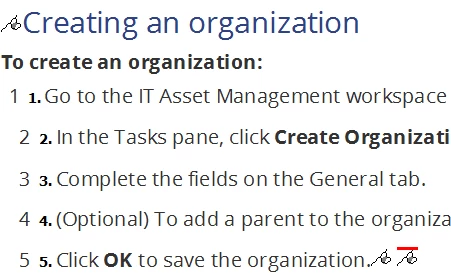
This is the code I see:
<?rh-list_start start="1" style="list-style: rh-list; list-style: rh-list;" ?><p
class="Numbered" style="margin-left: 17.712pt;"><span class="FM_StepNumber">1.<span
class="FMAutoNumber_1" style="padding-left: 7pt;"> </span></span>Go
to the IT Asset Management workspace and expand the Finance and Organization
Management > Organizations folder.</p><?rh-list_end ?>
It's the same for every step. It appears RoboHelp still thinks it needs to number the steps even though I've changed the option to convert to text. I have updated the FM files, which are linked to my project, not imported. I have regenerated output. I even created a new project, with the same Frame files, but the results were the same.
Not sure what the next step is so I would appreciate some advice.
Thanks
Gerry


 AdChoices