



michelled60596123
Known Participant
December 6, 2021
Question

Autonumbering and Heading Styles - H1, H2 etc

  • December 6, 2021
  • 6 replies
  • 2226 views

Hi all, please help me if you can...

I have read the Help and tried to implement the Autonumbering feature for H1, H2 etc. but I can't get it to work.


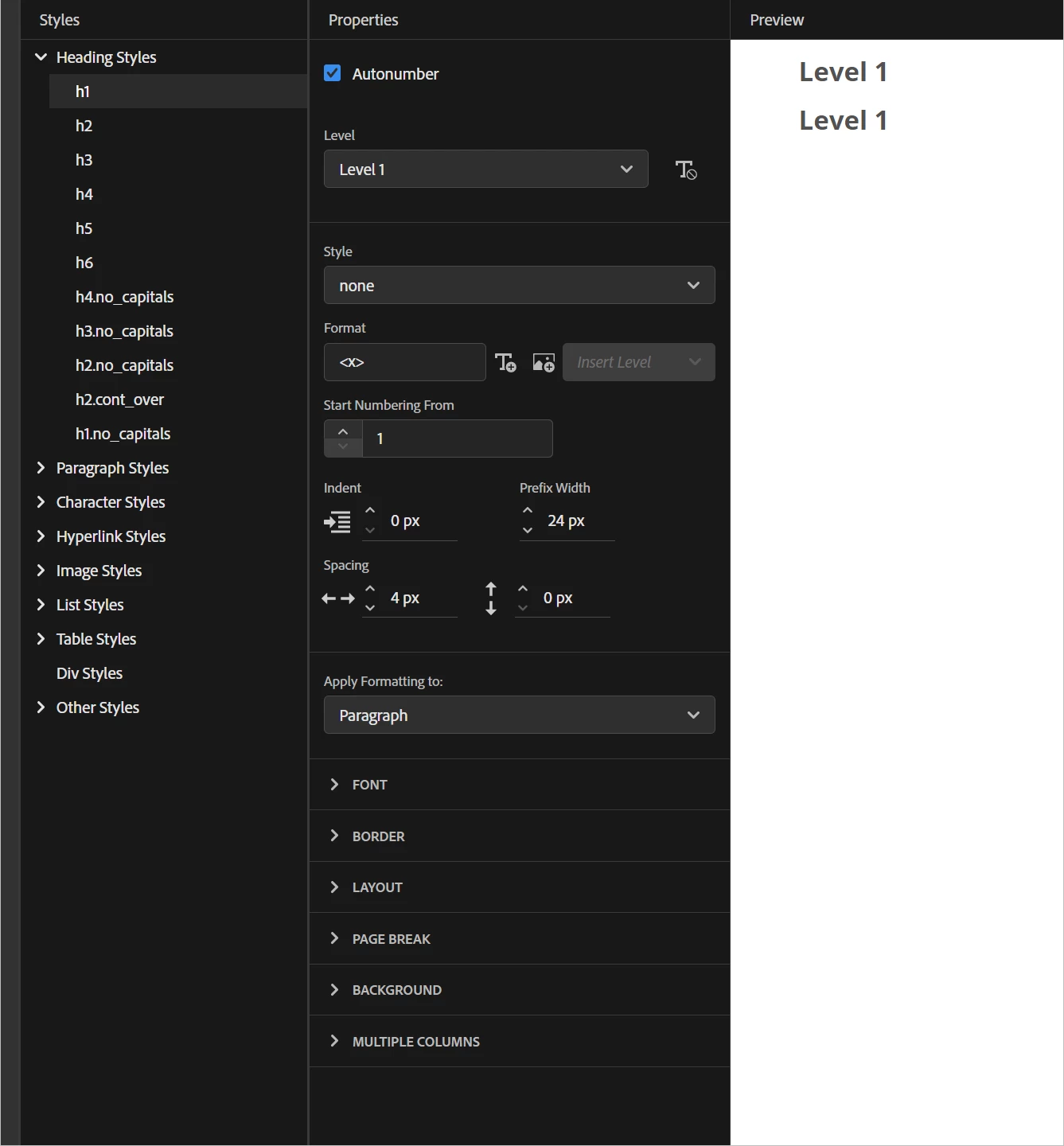
Do I simply need to create Autonumber styles level 1, level 2, level 3 etc for Heading Style - H1 and then the level styles drive the numbering/styles for H1, H2 etc


Or do I go through each Heading Style and enable Autonumbering, select the Level and add the properties as necessary.

Any guidance is greatly appreciated

Thanks Michelle  for Heading Style H1 
    This topic has been closed for replies.

    6 replies

    Peter Grainge
    Community Expert
    Community Expert
    May 26, 2022

    I'm sorry to say the method to sent to me was based on a misunderstanding about the requirement. I found issues that I went back and forth on and once the misunderstanding had been clarified, Adobe confirmed my method is what you need to use in 2020.


    That leaves us with the bug and I have asked if there is a workaround for that.


    The good news is that working the way you want is being considered for the next full version due later this year.

    ________________________________________________________

    My site www.grainge.org includes many free Authoring and RoboHelp resources that may be of help.


    Use the menu (bottom right) to mark the Best Answer or Highlight particularly useful replies. Found the answer elsewhere? Share it here.
    Inspiring
    February 21, 2023

    Hi Peter,

    have you heard anything more from Adobe? I am working with RH 2022.0.346 and I have toyed around with RH's autonumbering and the counter-reset and counter-increment functions, and it is still messing up my PDF's heading numbering.

    I have two outputs: HTML and PDF, same content, different CSS.

    For my HTML output, I am working with our company's css - I cannot change anything there (especially not h2...h5 to different h1's with different settings). I need to stay with h1...h5 and, for my PDF, need a working numbering (as our customers print the documents).

    Peter Grainge
    Community Expert
    Community Expert
    May 25, 2022

    Adobe have come back to me with a method of making this work with H1, H2 etc but it gives rise to some questions that I have gone back with.


    Once I have their reply, I will document the method.

    ________________________________________________________

    My site www.grainge.org includes many free Authoring and RoboHelp resources that may be of help.


    Use the menu (bottom right) to mark the Best Answer or Highlight particularly useful replies. Found the answer elsewhere? Share it here.
    Peter Grainge
    Community Expert
    Community Expert
    May 24, 2022

    I think I have a solution for your online output.


    Configure your levels for the autonumbered CSS so that Level 2 and Level 3 are styled to look like H2 and H3. The editor lets you apply different fonts, sizes, colours for each level.


    Then duplicate that CSS and in the autonumbering configuration set the Style to None rather than Decimal. The numbering will disappear. You will need to adjust the positioning.


    Use one CSS online and the other for PDF.


    Would that work for you?

    ________________________________________________________

    My site www.grainge.org includes many free Authoring and RoboHelp resources that may be of help.


    Use the menu (bottom right) to mark the Best Answer or Highlight particularly useful replies. Found the answer elsewhere? Share it here.
    Peter Grainge
    Community Expert
    Community Expert
    April 19, 2022

    I have been travelling. Have you resolved this now?


    Basically you create say H1 and set autonumbering for Level 1. Say red text 10pt verdana, then you set level 2 with say blue text 8pt verdana and so on. Styles as you choose.


    There is no relationship between lists and autonumbering.

    ________________________________________________________

    My site www.grainge.org includes many free Authoring and RoboHelp resources that may be of help.


    Use the menu (bottom right) to mark the Best Answer or Highlight particularly useful replies. Found the answer elsewhere? Share it here.
    bronxguys02
    Known Participant
    April 19, 2022

    I probably should have started my own thread. I want a list of steps to carry out a procedure. For example, 

    1. From the blah blah, select blah.

    2. Enter changes on the blah blah screen.

    3. Blah blah


    I have styles set for List Level 1, and separate styles for List Level 2-9 and List Level 10. I'm having trouble with the numbering in a topic. If I have two lists in the same topic, the second list continues the numbering from the first list. For example, if the first list had steps 1 through 8, the second list shows as starting with step 9, because it is continuing numbering from the end of the first list.


    I was reading on your page about the differences between autonumbering and ordered lists. Is it possible I am mixing these up?


    bronxguys02
    Known Participant
    April 19, 2022

    Never mind. I fixed my issue with the Content Properties. Thank you so much. 

    Peter Grainge
    Community Expert
    Community Expert
    December 6, 2021

    For basic

    1

    1.1

    1.1.1

    You would create that all at say H1. It is a single style that has the levels.

    H1 Level 1 = 1

    H1 Level 2 = 1.1

    H1 Level 3 = 1.1.1

    I strongly recommend you create a new project and test it out there rather than change your existing CSS and risk geting it wrong.

    ________________________________________________________
    See www.grainge.org for free Authoring and RoboHelp Information

    Use the menu (bottom right) to mark the Best Answer or Highlight particularly useful replies. Found the answer elsewhere? Share it here.
    Steffen Riek
    Inspiring
    May 23, 2022

    Hi Peter,

    I struggle with the same question - and find this a strange solution.
    What I would have expected is:

    H1 = Level 1 = 1..., 2..., 3...

    H2= Level 2 = 1.1, 1.2, 1.3, ...

    H3= Level 3 = 1.1.1, 1.1.2, 1.1.3,...

    When setting the Autonumber formats in this way, the preview shows the correct structure:

    When publishing a PDF it does not work.

    I use different css for online and PDF: online without numbering, PDF with numbering.

    If I would follow your way using always h1, how do I tell the lower level headings to be a lower level when using the online-css while creating content?

    Thanks for your really needed help

    Steffen


    Peter Grainge
    Community Expert
    Community Expert
    May 23, 2022

    If you are using autonumbering you only need to define H1 with however many levels you want. You define the appearance of each level separately so you would create Level 1 to look the same as H1 looked without numbering, then you define Level 2 to look like H2 would without numbering.


    That way you end up with say 3 levels. In this example I have just changed the font size at each level.


    Before I changed the font sizes to illustrate that point, I generated an online output. Each of the headings is H1.

    1 Fifth Topic is from just applying H1 to the text.

    1.1 is from applying H1 to the text and pressing the tab key once.

    1.1. is achieved by pressing the tab key twice.


    You don't need H2 for the numbering. Only H1 has been used here.


    However, in PDF that came out as below.


    I have asked Adobe if they can advise me what is wrong here. I will post back when I get a response.

    ________________________________________________________

    My site www.grainge.org includes many free Authoring and RoboHelp resources that may be of help.


    Use the menu (bottom right) to mark the Best Answer or Highlight particularly useful replies. Found the answer elsewhere? Share it here.
    Peter Grainge
    Community Expert
    Community Expert
    December 6, 2021

    Have you read the instructions on my site? RH2020 Lists and Autonumbering (grainge.org)

    ________________________________________________________
    See www.grainge.org for free Authoring and RoboHelp Information

    Use the menu (bottom right) to mark the Best Answer or Highlight particularly useful replies. Found the answer elsewhere? Share it here.
    michelled60596123
    Known Participant
    December 6, 2021

    Yes I have