
Participant
November 25, 2020
Answered

Autonumbering Issue

  • November 25, 2020
  • 2 replies
  • 429 views

With the new RoboHelp 2020 I can no longer simply right-click on a step and change the numbering. Can someone please tell me how to change an ordered list numbering?


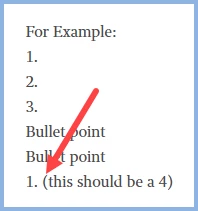
For Example:

1.

2. 

3.

Bullet point

Bullet point

1. (this should be a 4)
    This topic has been closed for replies.
    Correct answer Peter Grainge

    ________________________________________________________
    See www.grainge.org for free Authoring and RoboHelp Information

    2 replies

    Peter Grainge
    Community Expert
    Peter GraingeCommunity ExpertCorrect answer
    Community Expert
    November 25, 2020

    ________________________________________________________
    See www.grainge.org for free Authoring and RoboHelp Information

    Use the menu (bottom right) to mark the Best Answer or Highlight particularly useful replies. Found the answer elsewhere? Share it here.
    ruby6322Author
    Participant
    November 25, 2020

    Hi Peter, I do not see a renumbering box in the Properties to reset. Can you please show me where it is?

    ruby6322Author
    Participant
    November 25, 2020

    Peter, I just found it. Thank you again for your help.


    Bill

    Peter Grainge
    Community Expert
    Community Expert
    November 25, 2020

    Click in front of the bracket on the line that should be 4. In Properties you should see Restart Numbering.

    ________________________________________________________
    See www.grainge.org for free Authoring and RoboHelp Information

    Use the menu (bottom right) to mark the Best Answer or Highlight particularly useful replies. Found the answer elsewhere? Share it here.
    ruby6322Author
    Participant
    November 25, 2020

    Hi Peter, I am sorry, which brackets are you referring to?