


Answered
Background shading hides condition tag color in Author view
In RoboHelp 2020, we have tables with alternating background colors per row (alternating white and gray). We apply condition tags to some rows. In Author view, the white rows show the condition tag colors and the gray ones do not. The condition tags do still function correctly. It's just not easy to see in Author mode what has a tag and what does not.
Below, both Example2 and Example3 are tagged. Only the white row shows the condition tag color (purple). It would be nice if Example2 also showed the condition tag color (purple) rather than the gray background color.
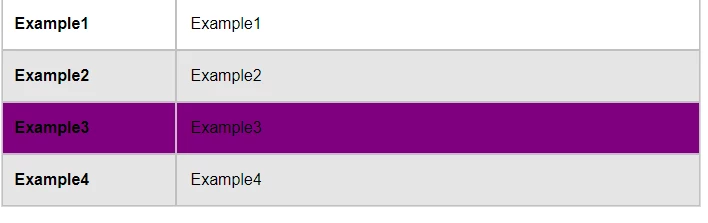
Is there a way to make the condition tag color take priority over a background color of a table row in Author mode?
Thanks!


 AdChoices