



Jared Hess
Legend
March 11, 2022
Answered

Batch Generate in RH 2020?

  • March 11, 2022
  • 1 reply
  • 285 views

I'm re-trialing RH 2020, Update 7.

In RH 2017 there's a handy Batch Generate feature where you can select a bunch of outputs to generate in a few clicks as shown here:
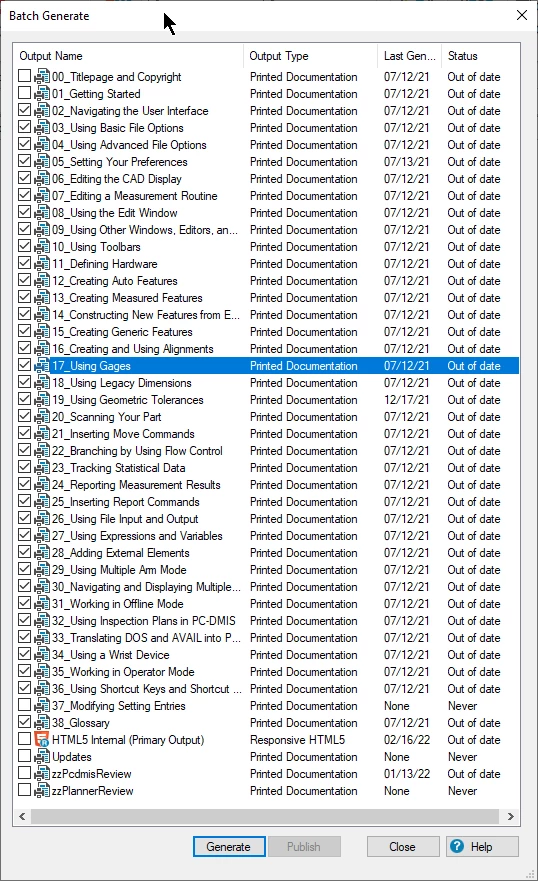
Does RH 2020 have such a thing? I checked the anemic help they provide and don't see this option anywhere. Anyway, I'm testing generating 36+ presets and don't relish clicking build 36 times. Not a huge deal, but still...

    This topic has been closed for replies.
    Correct answer Peter Grainge

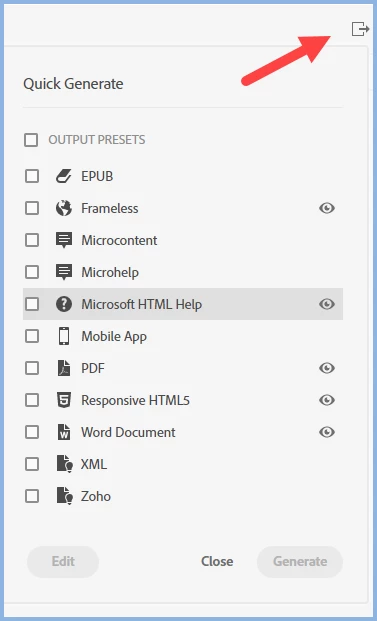
    Go to Outputs and click the icon shown.


    Then click any or all.

    ________________________________________________________

    My site www.grainge.org includes many free Authoring and RoboHelp resources that may be of help.


    1 reply

    Peter Grainge
    Community Expert
    Peter GraingeCommunity ExpertCorrect answer
    Community Expert
    March 11, 2022

    Go to Outputs and click the icon shown.


    Then click any or all.

    ________________________________________________________

    My site www.grainge.org includes many free Authoring and RoboHelp resources that may be of help.


    Use the menu (bottom right) to mark the Best Answer or Highlight particularly useful replies. Found the answer elsewhere? Share it here.
    Jared Hess
    Legend
    March 21, 2022

    Ah hah! Thanks Peter! That was it.  I see it...way over on the right of the window. This is the first time I've seen this Quick Generate icon after using this trial nearly daily for two weeks now. Why it's so far away from where one's eye is looking I don't know. I would have expected it to be more in the highlighted area where Output Presets are located:

    Anyway. That's what I was looking for.