


Inspiring
September 22, 2020
Answered

Best practice for inserting images (RH 2019, new UI)

  • September 22, 2020
  • 5 replies
  • 525 views

Hi, Everyone.


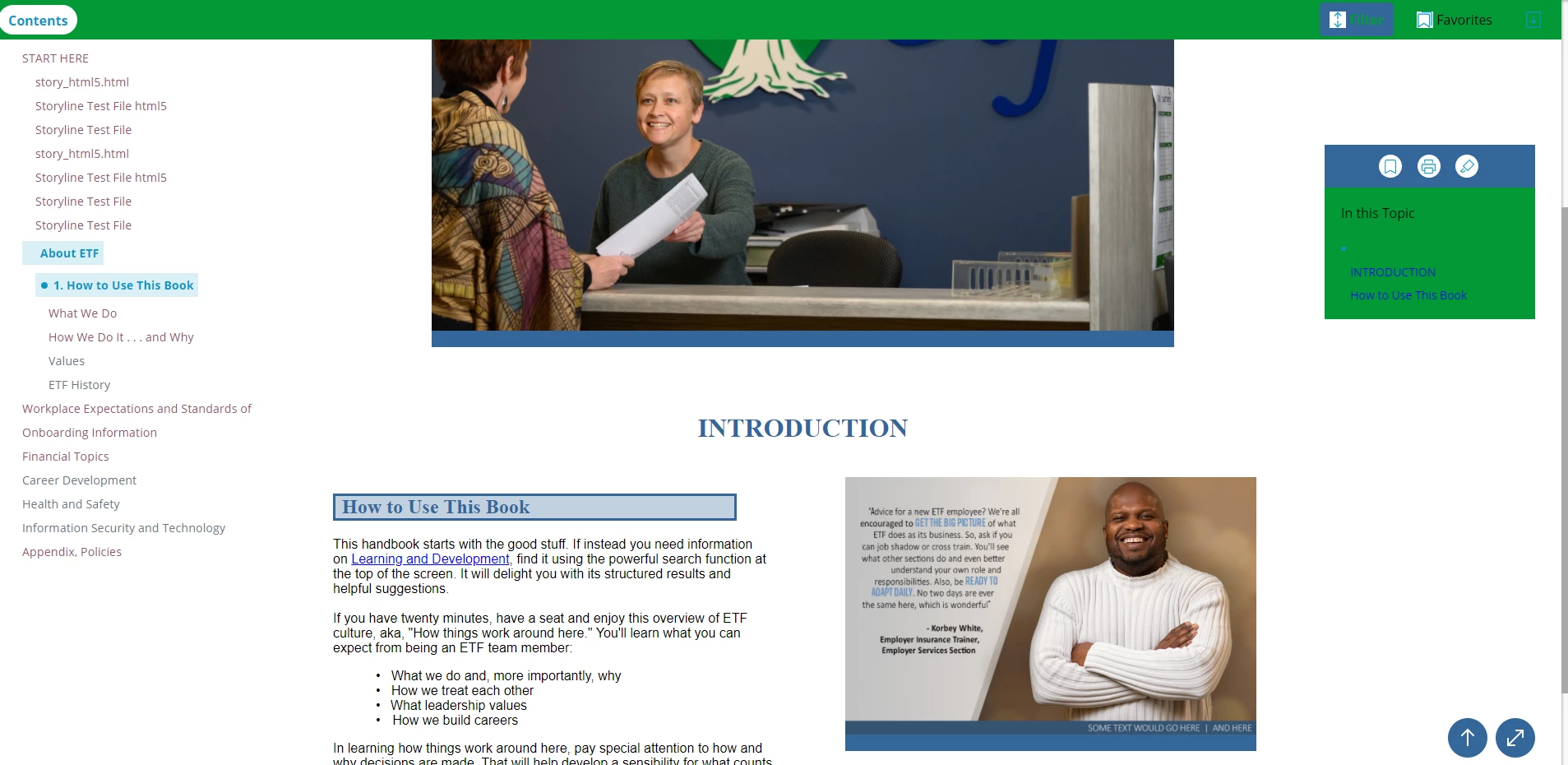
In RH 2019 (new UI), I'm using images essentially in just two ways:  at 700 px and at 500 px (Please see screenshot, below). My question is, Can I just insert the image without resizing it in the properties pane? (My image files are optimized JPEGs, of around 120k and 1000 px wide.)


So far, I've done both: 

  • Inserted images and adjusted the image properties to the specific size needed.
  • Inserted images and just left them alone, with no additional adjustment.


I don't see any difference in the output. 


What's the best practice, here?


Thank you!


SCREENSHOT:
    This topic has been closed for replies.
    Correct answer Amebr

    I'm not sure what you're asking.


    I never use the width and height settings within RH because that generally results in a poor image in the output. Instead I use an image editor to size the images to what I want in the output.


    I haven't used it, but I think the responsive and frameless outputs make all images "responsive" so they resize with the display area. If you don't want that to happen, I think you'll need to inspect the output using the Developer Tools to figure out what to override in your stylesheet. (It's probably a max-width setting somewhere.)

    5 replies

    Peter Grainge
    Community Expert
    Community Expert
    May 7, 2021

    I misread your first question. What you have found in Classic does the same.

    ________________________________________________________
    See www.grainge.org for free Authoring and RoboHelp Information

    Use the menu (bottom right) to mark the Best Answer or Highlight particularly useful replies. Found the answer elsewhere? Share it here.
    Peter Grainge
    Community Expert
    Community Expert
    May 7, 2021

    @Ackwriter Sorry, it's in Edit > Preferences.

    ________________________________________________________
    See www.grainge.org for free Authoring and RoboHelp Information

    Use the menu (bottom right) to mark the Best Answer or Highlight particularly useful replies. Found the answer elsewhere? Share it here.
    Inspiring
    May 7, 2021

    I'm using the 2019 Classic UI.  Is Edit>Preferences the path for Non-Classic?  I'm wondering if I should just bite the bullet and use the new UI. thoughts?

    Inspiring
    September 23, 2020

    Hi, Amber and Peter. 


    Sorry about the marble-mouthed question. But you've answered in ways that completely satisfy my need. And then some. 


    So, I'm good, now! Thanks so much. 


    Peter, thanks for that "File Association" trick. Very cool.

    Peter Grainge
    Community Expert
    Community Expert
    September 23, 2020

    The image with the man whose arms are folded is in a table. Tables will resize images. You can force the table and column widths but on resizing the window they will adjust proportionately so the image will still end up a different size.


    As Amber has said, the best way is to get your images the size you want outside RoboHelp and then add them.


    If you go to Edit > Preferences > File Association you can link to whatever you use for editing images. Snagit is the best tool.

    • In 2019 New UI when you right click an image and select Edit, it will open in the tool you have set. After you save the changes and return to RoboHelp you will not see the changes until you have closed and reopened the topic.
    • In 2020 you will see the changes when you return to RoboHelp.


    Use the menu (bottom right) to mark the Best Answer or Highlight particularly useful replies. Found the answer elsewhere? Share it here.
    Inspiring
    May 7, 2021

    I don't see the path you specify for Edit>Preferences>File Association.  I have File >Options which has the File Association option.  Why don't I see that path when I'm using the latest RoboHelp 2019  (version 14.0.14.002)?

    AmebrCommunity ExpertCorrect answer
    Community Expert
    September 23, 2020

    I'm not sure what you're asking.


    I never use the width and height settings within RH because that generally results in a poor image in the output. Instead I use an image editor to size the images to what I want in the output.


    I haven't used it, but I think the responsive and frameless outputs make all images "responsive" so they resize with the display area. If you don't want that to happen, I think you'll need to inspect the output using the Developer Tools to figure out what to override in your stylesheet. (It's probably a max-width setting somewhere.)