
Black frame added around Conditional Build object in RH.
We recently updated from TCS5 to Release 2015 and now we have a problem.
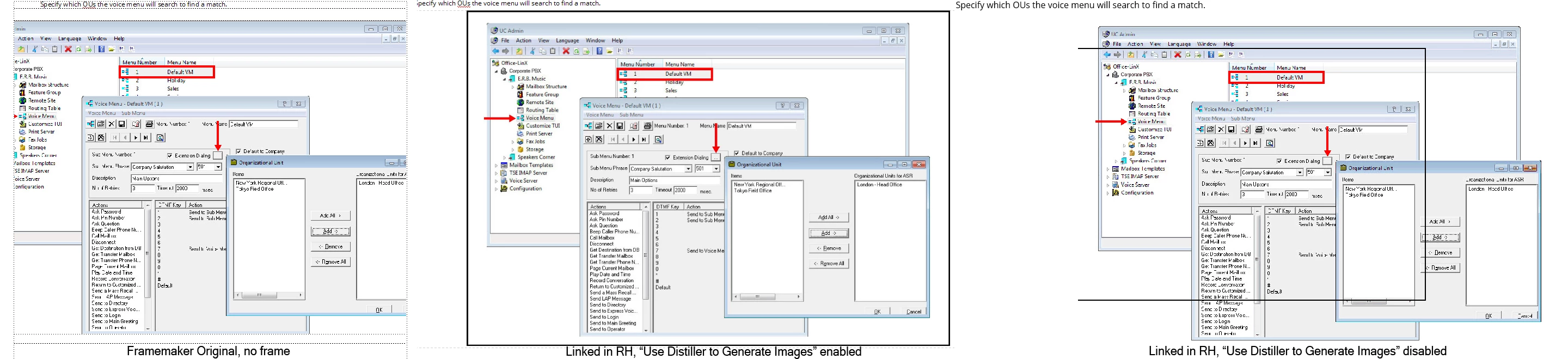
The RH project is linked to FM. There are some pictures that are set with a Conditional Build tag. Those pictures in RH are created with a black box around the edge. If I remove the CBT in FM, the black box goes away in RH.
In FM, there is a setting for CBTs to "Show Condition Indicators" where, if enabled, places a colored frame around each flagged picture. That is off in FM, but it seems to be stuck on in RH, and I cannot find anyway to turn it off.
If the Anchored Frame in FM is empty, then RH does not add the box. If I add anything into the Anchored Frame, the box returns.
If I turn off the option in RH to "Use Distiller to Generate Image", the image quality drops precipitously, and the box is now displayed within the image frame itself.
If you edit the picture in RH, it shows that the black frame is part of the image, so something is being added during the import.
This did not happen is any previous versions of TCS. How can I lose the box?


 AdChoices