

Sylvio @ GRICS
Known Participant
December 4, 2023
Question

Bold not applying to UPPERCASE words in RoboHelp UI

  • December 4, 2023
  • 16 replies
  • 1527 views

One of my colleagues is experiencing the strangest issue:

When editing a topic in the RoboHelp UI (RH 2022.3.93), the <strong></strong> attribute does not seem to apply to words in UPPERCASE. I have attached a screenshot to illustrate the issue. The text in the red rectangles should appear in bold.

Even text that should be boldened through the CSS is affected. In the attached screenshot, the line which starts with "Table A." is actually a H2 and has no inline formatting.
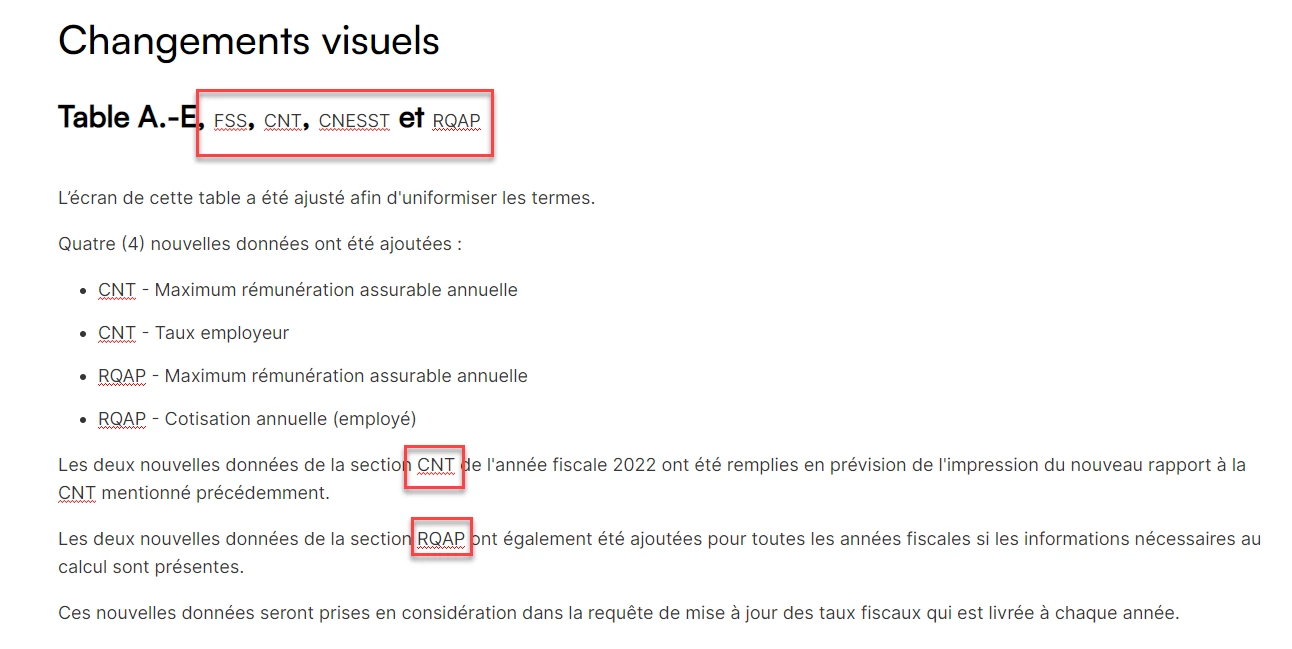
 

This only occurs while editing topics, within the RoboHelp UI. If we preview the topic in Google Chrome, everything looks as expected. The generated output is also fine. Also, when bold is applied to lowercase text (or Sentence-case text) everything is fine.


Stranger still, my colleague and I are both working on the same project, collaborating through GitHub integration. If I open the same topic on my computer, everything is fine on my side, even in the RoboHelp UI. The issue only occurs on my colleague's computer. We're both using Windows 11, and both using the Canadian-French version of both the Windows and RoboHelp UI.


I'm wondering if this could be caused by a regional setting or something? I've never seen this before and I have to admit I'm totally clueless as to what could be causing this!

    This topic has been closed for replies.

    16 replies

    Peter Grainge
    Community Expert
    Community Expert
    December 5, 2023

    This is the topic I was thinking about but the more I think about it, I am doubtful it is related. However, it may be worth trying what I suggested first.


    After that, I am wondering about corruption of your RoboHelp installation. It's not a common issue but neither is your problem. Can you install a trial version on another machine where RoboHelp will not be needed?


    Regardless I would be trying an ininstall, reboot and reinstall.


    Beyond that, there are a number of free HTML editors out there. Try the CSS and code in one of them.


    Sorry there is nothing definite here. As @Amebr indicated, whackiest problem I have seen.

    ________________________________________________________

    My site www.grainge.org includes many free Authoring and RoboHelp resources that may be of help.


    Use menu (bottom right) to mark as Best Answer or to Highlight particularly useful replies. Found the answer elsewhere? Share it here.
    Community Expert
    December 4, 2023


    Although I am admittedly baffled by the unbolded capitals in your heading, which definitely don't have any tags around them, so should just display as normal h2 text... Good job on having one of the weirdest display issues I've seen 🙂

    Community Expert
    December 4, 2023

    Is there a style for the strong tag in your css? Perhaps it has bolding turned off, but then is somehow being overridden in the generated output. Or if there is no strong style, perhaps add it with bold applied to see if that fixes it in the RH editor - but do check it doesn't have unintended consequences in your output (double-bold text can sometimes look weird).

    Sylvio @ GRICS
    Known Participant
    December 5, 2023

    No, there is absolutely nothing for the string tag in the CSS. What's really weird is that applying the strong tag to lowercase words works correctly, although I did not have any examples of that in these paragraphs. It's the weirdest issue ever!

    Sylvio @ GRICS
    Known Participant
    December 4, 2023

    Here is the heading I mentioned, in code view. As you can see, there is no inline formatting here:

    <h2>Table A.-E, FSS, CNT, CNESST et RQAP </h2>


    Here is the CSS code that formats this heading:

    h1,
    h2,
    h3,
    h4,
    h5,
    h6 {
    font-family: "Satoshi", sans-serif;
    line-height: normal;
    }
    h1 {
    font-weight: 500;
    font-size: 40px;
    color: #000;
    margin: 30px 0;
    }
    h2 {
    font-weight: bold;
    font-size: 30px;
    color: #000;
    margin: 20px 0;
    }


    Here are both paragraphs highlighted in the screenshot. Here, you can see that "CNT" and "RQAP" should be displayed is bold due to the <strong> tags, but this is somehow not working. (on my colleague's computer, that is...)

    <p>Les deux nouvelles données de la section <strong>CNT </strong>de l&#39;année fiscale 2022 ont été remplies en prévision de l&#39;impression du nouveau rapport à la CNT mentionné précédemment.</p>
    <p>Les deux nouvelles données de la section <strong>RQAP </strong>ont également été ajoutées pour toutes les années fiscales si les informations nécessaires au calcul sont présentes.</p>


    Peter Grainge
    Community Expert
    Community Expert
    December 4, 2023

    There's a bug found in 2022.3 with grouped styles. I doubt that is the issue here but try copying your CSS and not using groups. The bug should be fixed in Update 4 whenever that is but that won't help you right now.


    Alternatively there was a workaround posted. I quote


    ****************************************

    Simply create a new, empty CSS file and import it into your actual CSS file:

    @1552174 url(‘fixed_styles.css’);

    In the new CSS file, simply list all styles that are missing from the list without any selectors, …:

    h1 {}

    h2 {}

    p.Margintext {}

    ****************************************

    In that example only h1 and h2 were grouped.

    ________________________________________________________

    My site www.grainge.org includes many free Authoring and RoboHelp resources that may be of help.


    Use menu (bottom right) to mark as Best Answer or to Highlight particularly useful replies. Found the answer elsewhere? Share it here.
    Peter Grainge
    Community Expert
    Community Expert
    December 4, 2023

    Are you both on the same update?

    ________________________________________________________

    My site www.grainge.org includes many free Authoring and RoboHelp resources that may be of help.


    Use menu (bottom right) to mark as Best Answer or to Highlight particularly useful replies. Found the answer elsewhere? Share it here.
    Jeff_Coatsworth
    Community Expert
    Community Expert
    December 4, 2023

    What's that look like in source code view in RH?

    Peter Grainge
    Community Expert
    Community Expert
    December 4, 2023

    Please select a whole paragraph with this problem, switch to source view and post the code.

    ________________________________________________________
    My site www.grainge.org includes many free Authoring and RoboHelp resources that may be of help.


    Use menu (bottom right) to mark as Best Answer or to Highlight particularly useful replies. Found the answer elsewhere? Share it here.