Participating Frequently
March 17, 2014
Question

Books are not shown in the TOC of the printed document

  • March 17, 2014
  • 3 replies
  • 892 views

Hello,

I am using Robohelp 10. I have a project with several books and topics. When I generate a web help, everything is fine. But now, I have to generate a printed version of it. My problem is that on the table of contents of the generated document, the books are now shown. I need those books to be shown. Please advise.

I can not post the project I am using so I just used a very simple project which I created.

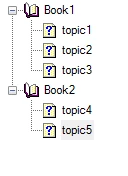
This is the original TOC.
and this is the resulting TOC in the printed document.
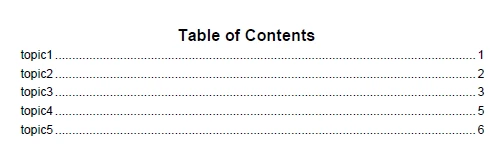
The books should still be part of the contents same with the original TOC.

I do not know what is wring with my set-up since I only used the default one. It will be great if you can reply to me ASAP since we need to publish our help document. Thanks a lot!


This topic has been closed for replies.

3 replies

Paula R. Stern
Participating Frequently
March 17, 2014

okay - one more suggestion. For some reason, this was happening to me - not so much with the entire TOC but with elements. For printed documentation only.

So try this and maybe it will help.

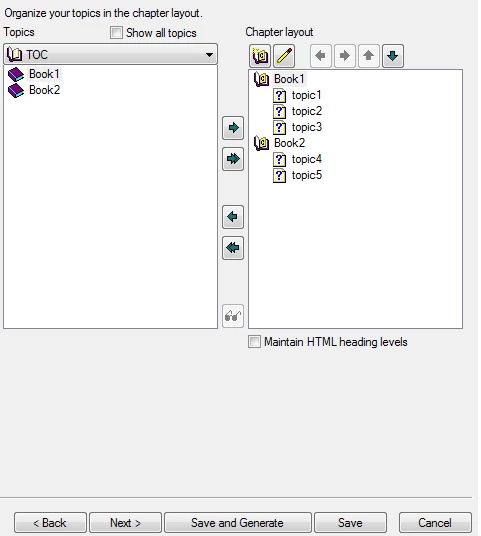
Go to the wizard and at the point (second screen...third, actually, I think) where it shows the TOC layout -move them all to the left and then move them to the right again - i.e. "delete" what is there and recreate it according to the TOC on the left - and generate. See if that helps.

I found that I was missing whole books. As far as I am concerned, this may be a bug and we should report it - but several times, RH has not updated based on saved changes to the TOC. By "deleting" and then recreating the TOC - as easy as clicking the arrow to the left and then to the right - the TOC was functioning correctly.

Participant
March 18, 2014

Hello Paula,

I did that too but it didn't work as well. I found from other site that the "bug" that you mentioned is not really a bug. When we did changes on the TOC of the project, the TOC on the dialogue when creating a printed documentation will not change. http://www.grainge.org/pages/authoring/printing/rh9_printing.htm

By the thanks for your help!

Paula R. Stern
Participating Frequently
March 17, 2014

What browser are you using? If Chrome...try reviewing the output in Internet Explorer to determine whether this is a browser problem or a RH problem.

Peter Grainge
Community Expert
Community Expert
March 17, 2014

@Paula. It's printed documentation.


See www.grainge.org for RoboHelp and Authoring tips

@petergrainge

Use the menu (bottom right) to mark the Best Answer or Highlight particularly useful replies. Found the answer elsewhere? Share it here.
Participating Frequently
March 17, 2014

Hi. I tried on sample projects but got the same problem. As a work around, I created toc in the generated docx file using MS word (References / Table of contents), delete the toc created from robohelp and generate the pdf file from word.

Peter Grainge
Community Expert
Community Expert
March 17, 2014

First try ticking that check box.

Then try with one of the sample projects. Click Open on the RoboHelp Starter page and then click Samples in the ribbon on the left.

Does that fix it?


See www.grainge.org for RoboHelp and Authoring tips

@petergrainge

Use the menu (bottom right) to mark the Best Answer or Highlight particularly useful replies. Found the answer elsewhere? Share it here.