


ChrisAlley
Known Participant
April 19, 2021
Question

Books in TOC show as broken links, even though a topic is linked to the book

  • April 19, 2021
  • 12 replies
  • 950 views

I don’t have much experience with RoboHelp, so I hope this turns out to have an easy fix. I’m using RoboHelp 2019 (14.0.3.019) to update an existing project that is linked to an existing FrameMaker document. The project was originally set to output to FlashHelp, but I was told to change to WebHelp.


The generated Help seems to be created properly, but I have a problem with the TOC. Every FrameMaker file that has lower-level headings is shown as a book in the TOC, as it should. But when you click on a book at any level, it displays a broken link.
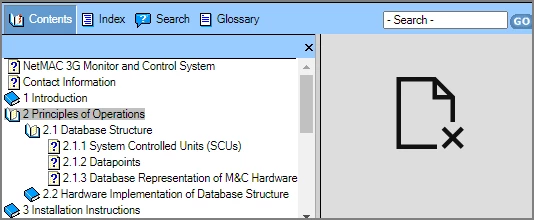
 

If you click on a topic, the content is displayed properly.


However, if you right-click a book and select “Open book in new tab” or “Open book in new window”, you see the correct content. So the correct content is linked to the book; it just will not display directly.


I hope someone can help with this problem. I’d like to click on a book in the TOC and have the content displayed properly, as well as revealing its subtopics in the TOC.


    This topic has been closed for replies.

    12 replies

    Jeff_Coatsworth
    Community Expert
    Community Expert
    April 20, 2021

    Is the FM TOC working correctly? That may be the issue - if it's not pointing to the correct content in FM, then RH isn't going to know where to point it too.

    ChrisAlley
    Known Participant
    April 20, 2021

    Yes, the FM TOC is working correctly. If you see my response to Amebr, it looks like the books are all linked to the correct files, they just won't display properly. 

    Community Expert
    April 20, 2021

    If you're switching from Flashhelp, you should go to Responsive HTML5 (in Classic. For RH2019 New UI or newer, then I'd recommend Frameless, as that's where Adobe development is likely to be focused.) Webhelp does not exist in RH2019 New UI or newer, only Responsive HTML5 with the responsiveness turned off, so you're better off going with the newer help output now, in my opinion. 


    Regarding the TOC problem, does clicking on a topic also result in the broken link or only books? If you open the TOC in Robohelp, right-click on a book and select Properties, what does the 'Link to' field show?


    ChrisAlley
    Known Participant
    April 20, 2021

    I'll check out the Responsive HTML5 output. Thanks for the suggestion.


    In the output, clicking on a topic always shows the linked page correctly. Only the books show broken links. In the TOC in RoboHelp, if I right-click a book and select Properties, it shows that the book is linked to the correct file. If I right-click the book and select Preview Topic, it shows the correct fille.