Known Participant
June 16, 2023
Answered

BreadCrumb for Responsive HTML5 (Azure_blue) on Robohelp2022

  • June 16, 2023
  • 6 replies
  • 2178 views

I try to move from RoboHelp 2019 classic to RoboHelp 2022 Update 2.

And I have problem on BreadCrumb on the difference between Robohelp 2022 and Robohelp 2019 Classic.


Somebody has the solution for me?


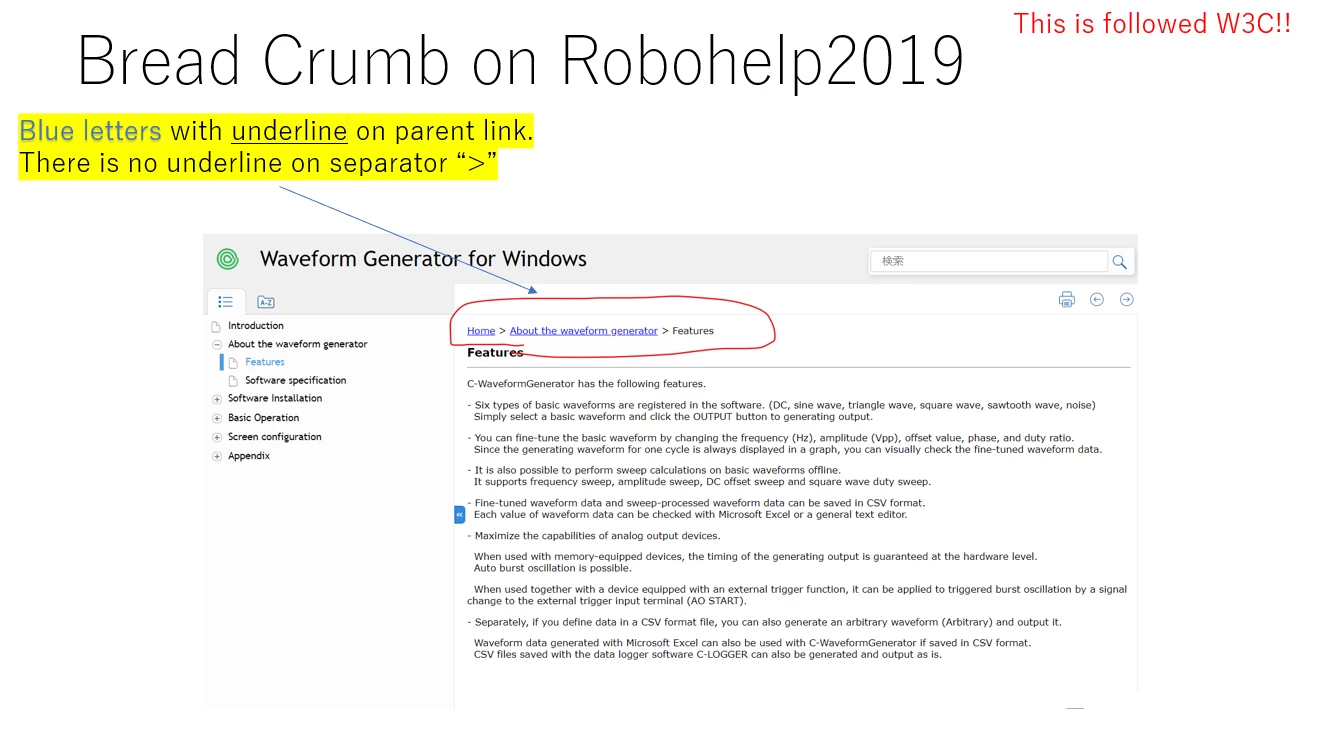
Here is BreadCrumb on Robohelp 2019.
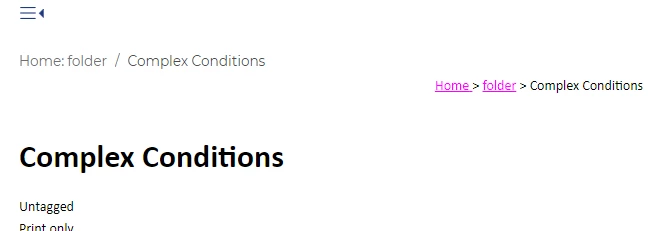
Here is BreadCrumb on Robohelp 2022.

And I can not same style as Robohelp 2019 even though I modified the robohelp settings.


I can change the letter color from black to blue and add underline.

However, I don't need underline on separator ">".


How can I do that?
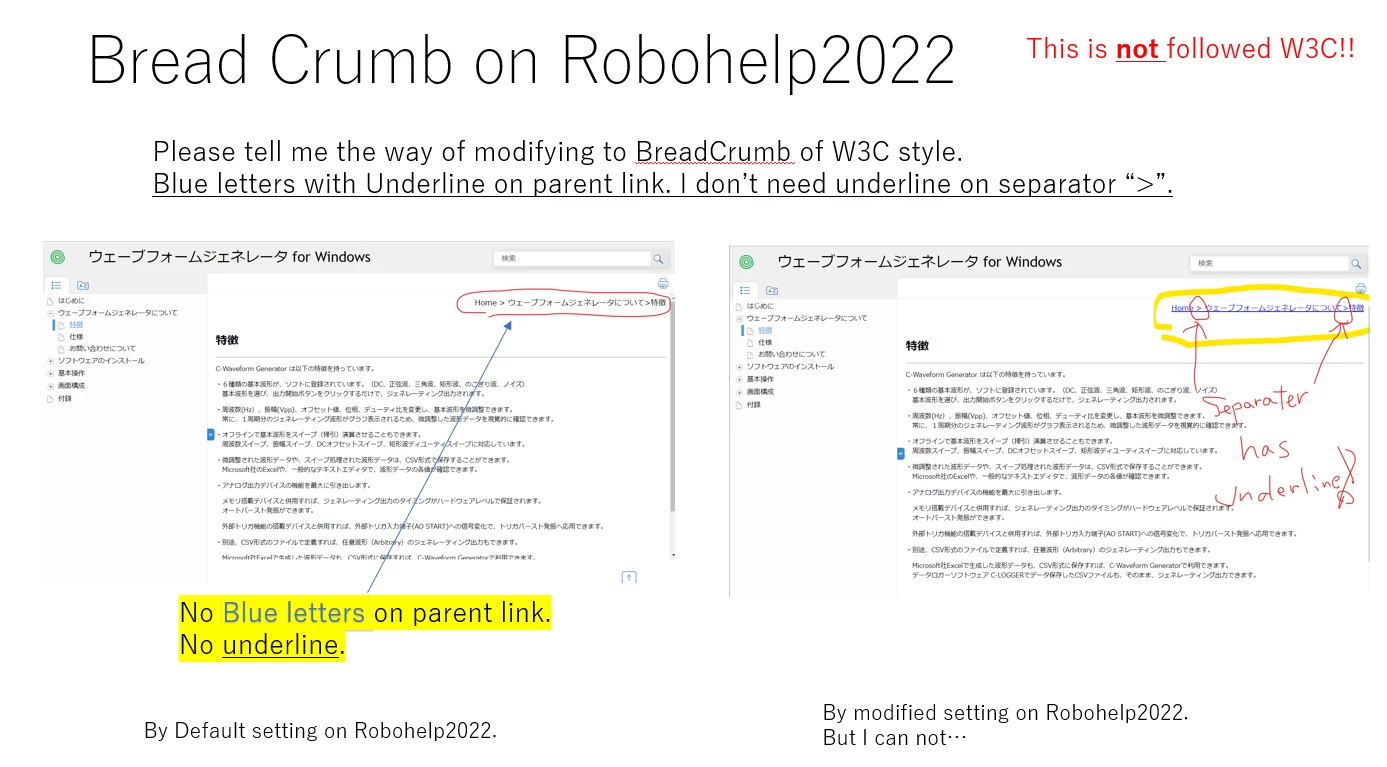


Please see the attached pptx file to know more details.

Thank you.
 

    This topic has been closed for replies.
    Correct answer Amebr

    Ugh, that'll teach me to not thoroughly test for bugs.


    Everything I said in my previous post is correct until you get to the last step of updating the style in the Author view.


    You'll need to update 2 styles to change the colour and add an underline. In addition, you'll need to then switch to code view to make some manual changes, because Adobe has included some inline styling in the output which mean you can't see those changes without some code changes.


    1. Update the following styles to add colour and underline:

    • a. breadcrumbs-home
    • b. breadcrumbs-link

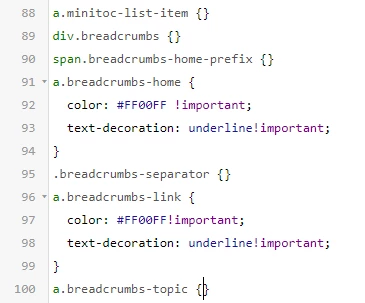
    2. Switch to code view and add !important after each of the properties you changed. You can see this in the following screenshot:

    Then the output looks like this:


    (Hopefully I've covered everything now. 🙂  )


    6 replies

    Peter Grainge
    Community Expert
    Community Expert
    June 19, 2023

    On frameless style, the update speed is too slower than I expect.


    If you mean the speed of publishing, the bug list shows Adobe believe they have found the cause and it is now in test. If successful it will appear in an update.

    ________________________________________________________

    My site www.grainge.org includes many free Authoring and RoboHelp resources that may be of help.


    Use menu (bottom right) to mark as Best Answer or to Highlight particularly useful replies. Found the answer elsewhere? Share it here.
    Known Participant
    June 20, 2023

    It is "TOC refresh speed is too slow on Frameless skin".


    Thank you.


    Peter Grainge
    Community Expert
    Community Expert
    June 20, 2023

    Refresh when? On opening the help? Do you see the same at RoboHelp Tour Introduction (grainge.org)?


    There is a pause, is that too slow for you or is it better than when you reported it?

    ________________________________________________________

    My site www.grainge.org includes many free Authoring and RoboHelp resources that may be of help.


    Use menu (bottom right) to mark as Best Answer or to Highlight particularly useful replies. Found the answer elsewhere? Share it here.
    Community Expert
    June 19, 2023

    Okay the breadcrumsb styles aren't added automatically to existing stylesheets. What I recommend is that you create a new, temporary project. This will create a new project with two stylesheets in it: book.css and default.css.


    Open the default.css file. You'll see it has a bunch of default styles already added.

    In the top right of the window click the </> (Source) icon to switch to code view.

    Copy the styles that contain the word "breadcrumbs". They should be all together in a fresh stylesheet: I've highlighted the list I can see. Make sure you include the closing curly bracket }; it could be on a separate line so double-check.

    In your real project, open your topic stylesheet and switch to code view. Scroll right to the bottom, press Enter after the last curly bracket }, then paste the breadcrumb styles.


    Now you can switch back to the Author view by clicking the pencil icon and edit the breadcrumbs-link style as usual.


    If you find you need the other styles (e.g. if you use a mini-toc/topic toc or see also button) you can copy those styles in the same way.


    See how you go with that.

    Known Participant
    June 19, 2023

    I will try this on my robohelp project. Then, I will get back to you, sooner.


    On frameless style, the update speed is too slower than I expect. 

    I have already reported to Adobe almost one years ago.


    Please refer "Bug ID - RH-10813 " on Adobe pre-release website if you want to know more details.

    Thank you.


    Peter Grainge
    Community Expert
    Community Expert
    June 19, 2023

    I decided to take a quick look again so that I could get the issue in my mind and ponder it.


    I created a topic layout with breadcrumbs and got this.


    Then I went back to your original post and saw what you want is coloured text and underlining. Both should be straightforward although I have not tested that. That's when reading again I realised the difficulty is having a separator that is not underlined. Something like this where I have cheated it with Snagit.


    I very much doubt that can be done but if it can it is beyond my skills.

    ________________________________________________________

    My site www.grainge.org includes many free Authoring and RoboHelp resources that may be of help.


    Use menu (bottom right) to mark as Best Answer or to Highlight particularly useful replies. Found the answer elsewhere? Share it here.
    Community Expert
    June 19, 2023

    What you've done in your screenshot is apply the styling to the entire breadcrumb "div" tag. 


    What you should find is that a "breadcrumb-link" style has been added to the stylesheet applied to your topic layout. At least, I found those styles added to the only stylesheet in a simple test project. You should find a few other breadcrumb styles added to it as well, but I don't think you need to change any of the others.


    Have a look and see what you find.

    Peter Grainge
    Community Expert
    Community Expert
    June 19, 2023

    @Amebr I just saw this after posting. @Naruto Haba Amber is more skilled in this area than I am so give it a try.

    ________________________________________________________

    My site www.grainge.org includes many free Authoring and RoboHelp resources that may be of help.


    Use menu (bottom right) to mark as Best Answer or to Highlight particularly useful replies. Found the answer elsewhere? Share it here.
    Peter Grainge
    Community Expert
    Community Expert
    June 19, 2023

    Take a look at RH2022 Topic Layouts (grainge.org) and in particular the section Style Sheets - CSS. I suspect that what is happening here is some inheritance with the CSS used in your project.


    With a frameless output such as the one on the part of my site I have pointed you to, they are automatic. See how they work there.


    Going forward Adobe will be focussing development on frameless outputs so I recommend considering frameless templates for your project. Other than bug fixes, it is unlikely there will be any changes to HTML5 outputs. The calls for frameless outputs are different using URLs so you need to discuss that with your developers if you use context sensitive help.


    HTML5 templates are far less easy to customise and I don't think I can help you much more on this one. I have quite a lot on over the next few days but I will try to set up what you have illustrated.

    ________________________________________________________

    My site www.grainge.org includes many free Authoring and RoboHelp resources that may be of help.


    Use menu (bottom right) to mark as Best Answer or to Highlight particularly useful replies. Found the answer elsewhere? Share it here.
    Peter Grainge
    Community Expert
    Community Expert
    June 16, 2023

    If I am following correctly you have what was WebHelp and that has this problem but CHMs do not.


    The new UI versions of RoboHelp use strict HTML5 and CSS3 code. CHMs do not understand that so the code has to be converted back to something the compiler does understand. Maybe that explains the difference.


    Now to your WebHelp. It is no longer WebHelp as such. During the conversion from Classic to the New UI, it became a responsive output. See Before You Proceed > WebHelp (in table) in this topic. RH2022 Upgrading from Classic Versions (grainge.org)


    The responsive templates have minimal customisation compared with the frameless outputs and at a quick glance breadcrumbs are not included in the template editor for responsive templates. They are for frameless. If you have customised the breadcrumbs for responsive, I am guessing that was through the CSS so I can't help on that.


    First though let's establish what you are generating. In the Presets does the icon show a 5 or a globe?


    Also try creating a new Responsive preset so that nothing gets overridden in your existing preset. Then apply a new template without any customisation and see what the breadcrumbs look like there.


    Let us know how that goes.

    ________________________________________________________

    My site www.grainge.org includes many free Authoring and RoboHelp resources that may be of help.


    Use menu (bottom right) to mark as Best Answer or to Highlight particularly useful replies. Found the answer elsewhere? Share it here.
    Known Participant
    June 19, 2023

    Hi, Peter,


    My icon shows "5" on "OUTPUT PRESETS".

    It is same situation of breadcrumb (no blue letter and no underline) even though I create a new project on Robohelp 2022 by default as below.


    I add "Topic Layouts" to add breadcrumb on my topic_layout on header.


    It is black letters without underline on bread crumb by Robohelp default.


    Here is the default bread crumb on Robohelp 2022.

    I need blue letters with underline on parent link. and I don't need underline on separator ">".


    Thhen I change the letter color from black to blue and I add underline on bread crumb.

    However, the underline is on seperator ">" as well.

    Nobody can not realize there is "parent like" on bread crumb.

    It is no good for my customer.


    Here is my setting on bread crumb.


    And This is my appearance.


    Thank you.