Known Participant
July 29, 2009
Question

Breadcrumbs in Pop-Ups

  • July 29, 2009
  • 4 replies
  • 4568 views

Can I disable the breadcrumbs in pop-up boxes?  If so, how?  In this example, I want to remove the breadcrumb reference:
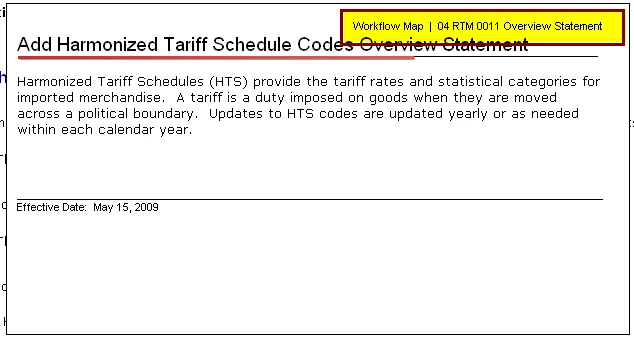
Please let me know.

    This topic has been closed for replies.

    4 replies

    Participant
    December 13, 2010

    In Robohelp 8, breadcrumbs are the default.

    To remove breadcrumbs:

    1) click Pods - Single Source Layouts.

    2) Then in that pod select the layout you are using such as WebHelp.  Right click and choose Properties.

    3) Click "Next" at the bottom of the Properties pop-up

    4) on that next page, UNCHECK the "Add Breadcrumbs Link".

    5) Generate your Primary Layout again and the breadcrumbs will be gone.  Voila!

    Peter Grainge
    Community Expert
    Community Expert
    December 13, 2010

    Kiss888

    That will turn off ALL bookmarks except those specified in a master page. I believe M Boyd only wanted to turn them off in popups if that could be done easily.

    M Boyd

    Rick had no way of knowing that you could not easily identify your popups. There is a way but I will readily accept it might not suit. However, we can only suggest things, it is for you to decide how viable they are using your knowledge of your project.

    The format for a popup is

    <a href="javascript:BSSCPopup('New_Topic.htm');" id="a1">topic</a>

    A tool like FAR from http://www.helpware.net can be configured to search on <a href="javascript:BSSCPopup and capture the rest of the link. That would give you a list of your popup topics so that you could select all others and associate them with a master page with breadcrumbs. There is a wrinkle in that a topic can be a topic in its own right and be a popup. It's how you call a topic that makes it a popup from that call.

    It won't be quick so it all depends on how much you want to get things working your preferred way.


    See www.grainge.org for RoboHelp and Authoring tips

    @petergrainge

    Use the menu (bottom right) to mark the Best Answer or Highlight particularly useful replies. Found the answer elsewhere? Share it here.
    M_Boyd
    Inspiring
    February 10, 2010

    I have the same problem. We implemented breadcrumbs in RH7 and were thrilled with them. In RH7, popups did not display breadcrumbs, which seems entirely reasonable.

    Now that we've switched to RH8, breadcrumbs are displayed in all of our popups. Rick, I really do appreciate the helpful information here, but the last line of your post ("it may take you all of 30 seconds") is very glib and seriously incorrect -- at least in my situation and probably in other people's too. We have dozens of help systems to maintain, and many, many thousands of files. Just opening up each system and making one change takes awhile. Next, you cheerfully assume that when I look at the list of topics, I'll immediately recognize which ones are popups. Guess what? I won't!  It's going to take awhile. I'll probably just disable popups because our small doc group really doesn't have the bandwidth.

    The thing that's annoying is that it worked so beautifully before. I can't imagine that breadcrumbs from popups would ever be useful to anyone, but I could be wrong (maybe people requested it and that's why they're displayed now -- I don't know). But there should be a global option to display or not display them in popups.

    Inspiring
    August 6, 2009

    I will assume you're using RH8 since Breadcrumbs are new in RH8.

    I have a similar problem - see http://forums.adobe.com/message/2160584

    Also, I've tried using a new Master Page for all the pop-up topics and no luck. I've tried turning off all breadcrumbs and it's like something is still lingering from breadcrumbs because my pop-ups don't display correctly then either (for my image maps). I've even tried putting in a breadcrumbs placeholder in the master page and then conditionally building that to leave it out - and that doesn't work either. Looks like this breadcrumbs feature is interfering with all pop-ups.

    Captiv8r
    Legend
    August 6, 2009
    Captiv8r
    Legend
    July 29, 2009

    Hi there

    What version of RoboHelp are you using? What RoboFlavor? We have outlined what you should insert in posts at the link below:

    Click here to read

    I'm guessing you didn't read that, so now we must ask more questions and delay the answer.

    Cheers... Rick

    Helpful and Handy Links

    Known Participant
    August 2, 2009

    I apologize, and no, I did not read the helpful hints (shame).  So...

    I am working in RH8 / RoboHelp for HTML.

    Cindy

    Captiv8r
    Legend
    August 2, 2009

    Thanks for the info.

    In RoboHelp 8 Breadcrumbs are handled in new ways. (That's why I needed to know the version.)

    We still don't know how you have implemented them, so I'll just outline how each way works.

    1. The older way - You simply enable breadcrumbs in the Single Source Layouts recipe. This approach provides little control over them. You have them added to each topic or you don't. The option in the layout makes it happen. (or not)
       
    2. The new way - You create a Master Page (formerly called a Topic Template) and insert a Breadcrumb Placeholder. Then apply the Master Page to specific topics. In this case, you woud omit any topics you intend to use as popups.

    Hopefully this helps... Rick

    Helpful and Handy Links

    RoboHelp Wish Form/Bug Reporting Form

    Begin learning RoboHelp HTML 7 or 8 within the day - $24.95!

    Adobe Certified RoboHelp HTML Training

    SorcerStone Blog

    RoboHelp eBooks