


Inspiring
August 31, 2021
Question

Breadcrumbs issue

  • August 31, 2021
  • 6 replies
  • 156 views

Hi Everyone.


I've just tried adding breadcrumbs to my Master Page. But they look funky. Each topic in the breadcrumbs has a number that covers the separator:
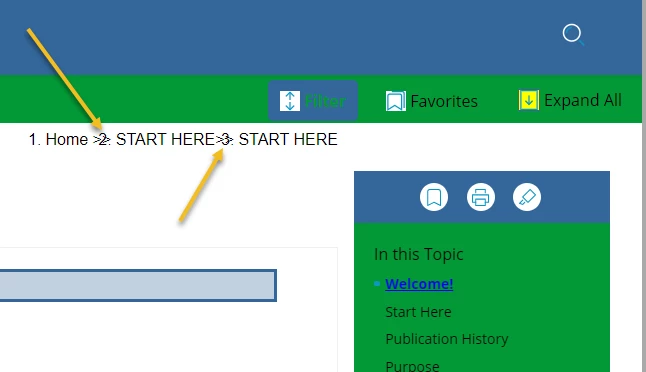
 

How do I edit out those numbers? I don't see anyplace in the "Content Properties" pane to do that.


Do I do it in the CSS? If so, where?


Thank you!


    This topic has been closed for replies.

    6 replies

    Inspiring
    September 1, 2021

    Excellent - I didn't there were settings for breadcrumbs in the skin editor.


    THank you, Amber! I've run out of time this week and will have to revisit this next week.

    Community Expert
    September 1, 2021

    Also, double-check the title in the topic properties. The breadcrumbs use the value in the title field, which may be different from your H1 in the topic.

    Community Expert
    September 1, 2021

    Have a look in your skin Topic Page > Breadcrumbs. 


    (Given all your skin issues, I'd be tempted to start with a fresh skin, making changes one by one and checking everything looks as you expect before making another change.)

    Inspiring
    August 31, 2021

    PS:  Here's the code for the breadcrumbs:


    Thank you!


    Inspiring
    August 31, 2021

    Hi Peter.


    Yes, my topics are all numbered (i.e., the "file names" are numbered). The original, imported MS Word content was numbered when I imported it all.


    But none of my titles are numbered.


    Is there a way to disable the numbering in the breadcrumbs? Or will I have to delete the numbers in all of my topics/file names?


    thank you!

    Peter Grainge
    Community Expert
    Community Expert
    August 31, 2021

    I'm guessing your topics or titles or something are numbered.

    ________________________________________________________
    See www.grainge.org for free Authoring and RoboHelp Information

    Use the menu (bottom right) to mark the Best Answer or Highlight particularly useful replies. Found the answer elsewhere? Share it here.