
Known Participant
November 7, 2011
Answered

Broken Links in RH8 - More Clarification Please

  • November 7, 2011
  • 1 reply
  • 720 views

Dear Experts,

I tried following through the other topics posted relating to this topic, however they all seemed to be different than what i am seeign within my project. I know how to correct borken links (per say) within the folders themselves, however, when in the actual folder "broken links" within the project manager, I cannot seem to delete the links that no longer are needed, or to clearly see if I still need them, its a bit overwhelming, as I moved some information within a project, and (while my application kept crashing - whole different story), each time I re-opened, it didn't seem to clear out the changes I had made through the clear caching as I have as my set up.

Within the PM, if I right click on the broken link, I do not get an option for Explore, I only have the below:
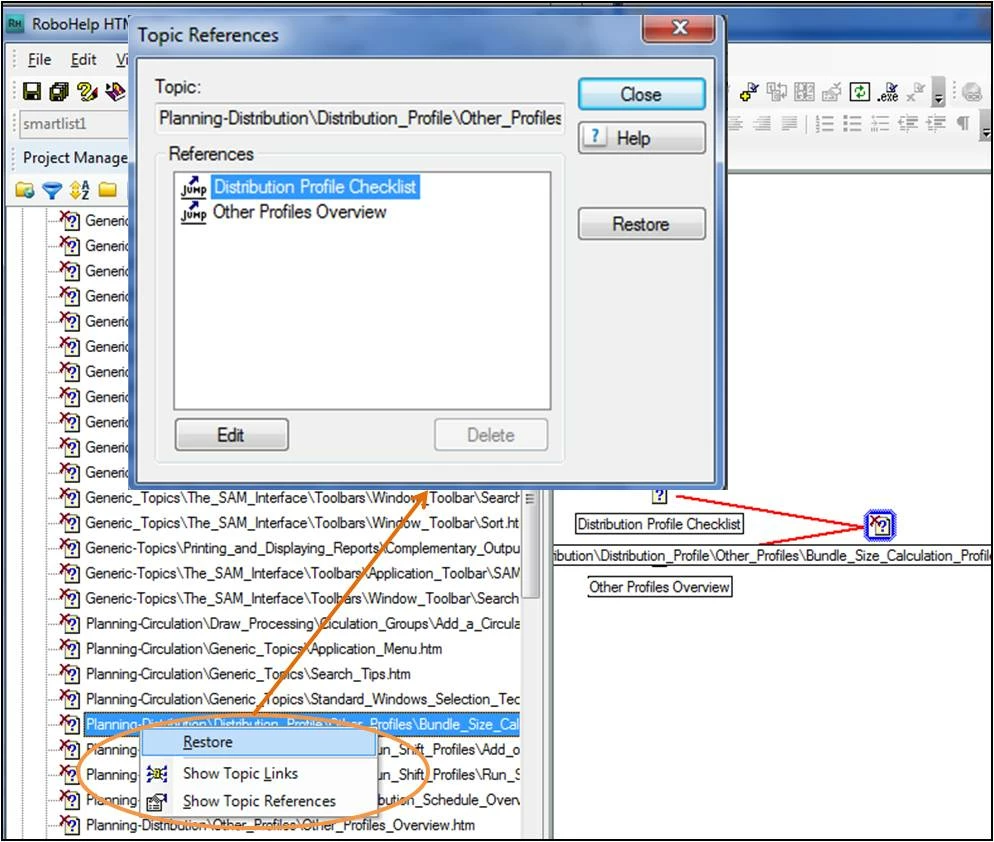
However, when I click on Restore within this dialog box, or even if I select the Show topic Link and try and restore, nothing happens. I tried to fix by going into one of the actual topics and deleting the link and then re-inserting and it and then saving the information, but it still remains. I unfortunately broke the links to actual topics that are utilized throughout the entire project, (like fundamental ones for generic searching and stuff)....so it now created havoc for me, and I just cant seem to get started with just one. I know if I can get one going, I will be able to quickly fix the others, but can't figure it out. (probably right under my nose).

This topic has been closed for replies.
Correct answer RoboColum_n_

This sounds like there were unsaved changes to your project when the project / PC crashed. As a result RoboHelp has got a bit lost as to what should be there. I think the answer is first of all to close your project backup and then delete your project's cpd file. If the project still displays the broken links, open the individual topic files containing links and ensure they are pointing to the right file. It may be best to reinsert the links. Save as you go and hopefully the broken links will disappear. Let us know how you get on.


  The RoboColum(n)   @robocolumn   Colum McAndrew

1 reply

Community Expert
November 8, 2011

Can you clarify if the file in Broken Links is supposed to exist or not? So in your picture is "Bundle Size Calculation Profile..." supposed to be in your project, or is it supposed to be deleted?

pmudge07Author
Known Participant
November 8, 2011

All of the links from what I have seen individually are supposed to be there.....however, what is interesting, is that when i go to the actual topic and click on the link, it works....so not sure why they show up in Broken links. I know when I was working on the file yesterday, when I was moving folders and importing information, the PM did seem to break alot (meaning it kept crashing when I tried to import or move a topic from a folder), and when I reopened the file, topics within the folders were then lost and I had to reimport, or delete and then reimport. It was all very confusing yesterday....hoping my computer today is in a better mood

RoboColum_n_
RoboColum_n_Correct answer
Legend
November 8, 2011

This sounds like there were unsaved changes to your project when the project / PC crashed. As a result RoboHelp has got a bit lost as to what should be there. I think the answer is first of all to close your project backup and then delete your project's cpd file. If the project still displays the broken links, open the individual topic files containing links and ensure they are pointing to the right file. It may be best to reinsert the links. Save as you go and hopefully the broken links will disappear. Let us know how you get on.


  The RoboColum(n)   @robocolumn   Colum McAndrew