Inspiring
December 1, 2014
Answered

Browse Sequence Stopped Working

  • December 1, 2014
  • 1 reply
  • 1108 views

I generated WebHelp output files on 11/19/14 (less than 2 weeks ago) in which the browse sequence works as expected.  When I generated output today, I noticed that the browse sequence buttons were not displaying.  I'm using RH 10 with IE 11.  I am the only person who accesses the RoboHelp project files for this project.

I checked the WebHelp project settings and noticed the "Enable Browse Sequence" box was not checked.  I checked it.  I regenerated the project.  The browse buttons now appear but remain disabled.  I used the Browse Sequence Editor to regenerate the browse sequence from the TOC.  It did not work as expected.  Instead of following the TOC sequence, it put all the first-level books at the beginning of the browse sequence, then all the second-level books, and so on.  Just the same, I saved and regenerated the project.  The browse buttons still appeared, but still remained disabled.  I used the Browse Sequence Editor again to regenerated the browse sequence based on the TOC using the option to create separate browse sequences for each book down to level 5 (just an arbitrary number).  RH created a bunch of separate browse sequences.  I clicked OK again and regenerated the project.  I still see disabled browse buttons, and I tried clicking multiple topics in different books to see if any of the separate browse sequences worked.  The browse buttons remained disabled.

I reviewed previous RH posts on this subject.  I saw Julietta Curtis' post on browse sequences not working in IE 10 but working in Chrome and Firefox.  I opened in Chrome and Firefox the last two versions of the WebHelp I generated; same results as IE 11--disabled browse buttons.  I opened the WebHelp from 11/19/14 in Chrome and Firefox; the browse sequence works fine.

Note:  I also tried regenerating the project using the project's .BRS file from prior processes--including .BRS files going back to 10/29/14.

Any thoughts on how to get the browse sequence working again?  Thanks!

This topic has been closed for replies.
Correct answer Amebr

Thanks for reply.  Noted in original post that I saw the "Enable Browse Sequence" box on the WebHelp Settings window had become unchecked, and I checked it before attempts above to get browse sequence to work again.  Where would I check in the SSL to see if browse sequence had become unticked?

Additional note: I have had issues with this project in the past.  It is one I "inherited", and the browse sequence had been quirky at best until I manually edited the project's .BRS file to resolve issues created by duplicate topic names (not re-use of same topic, but multiple prior authors assigning same name to multiple different topics and including them in different locations within the TOC).  Had hoped restoring old working .BRS file would resolve this issue, but it didn't.


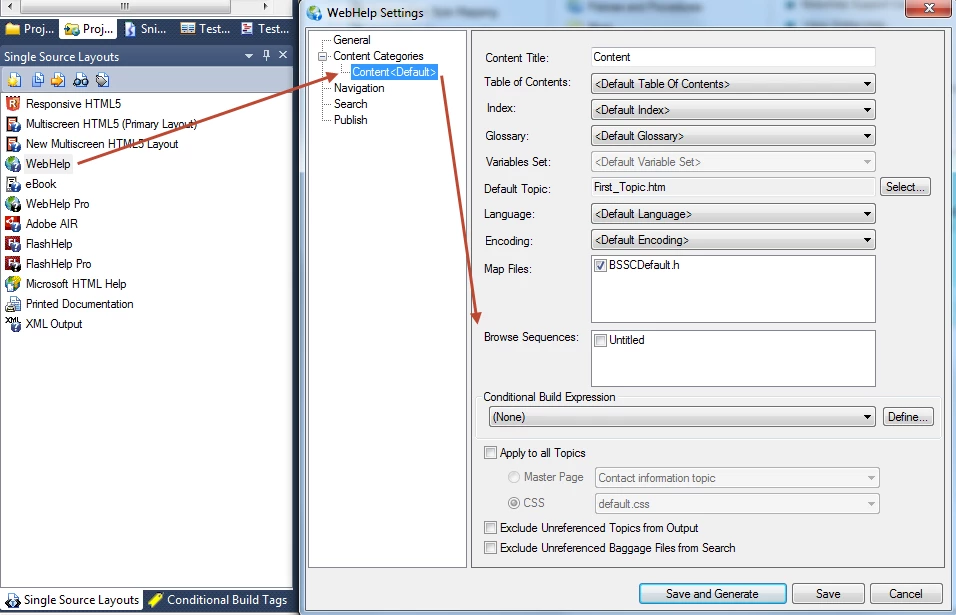
I assumed you meant Project Setup pod > Windows > [webhelp window] > Properties.  Then I discovered there are two places in the SSL related to browse sequences.

So there are two actions you need to take to use a browse sequence.

1. Enable browse sequences for the output.

2. Specify which browse sequence you want to use (you have to do this even if you only currently have one).

The one I think you might need to do is the second step. You can find this in the SSL under Content Categories > Content <Default>. (if you use content categories you might have to set for each one, I assume.)

Regarding Word 2013 and RH10, the forums indicate that while 2013 is not supported by RH10, using right-click > Generate on your Print Documentation SSL should allow you to generate printed output. But some people have not managed to get this to work, so your mileage may vary. Office 2013 Support on Robohelp 10

1 reply

Captiv8r
Legend
December 1, 2014

Hi there

Regenerate the sequence again and choose 0 for the level. You should then get a sequence matching your TOC.

Cheers... Rick

Inspiring
December 1, 2014

I know choosing zero should work to create a browse sequence that matches the TOC structure (and it does for my other projects) ...

... but it doesn't for this one...

When I generate the WebHelp using this RH-created browse sequence, the browse sequence does not work.  With "Introduction" selected in the TOC, which should enable the "down" browse button, the "down" browse button remains disabled.

Community Expert
December 4, 2014

For the buttons, perhaps make sure your browse sequence hasn't become unticked in your SSL?