
Known Participant
September 29, 2009
Answered

Browse Sequences

  • September 29, 2009
  • 1 reply
  • 1445 views

I am using RoboHTML V7.03.0001

I think I am missing the boat about what browse sequences are and how to set them up.

First of all, from what I understand, browse sequences are the << and >> arrows that display so you can quickly navigate through a series of topics one topic at a time.  If this isn't correct, please re-educate me

Second, I am trying to setup browse sequences in a small help file to see if they will be beneficial to my users.  I have my help file (primary layout is WebHelp) with a TOC.  I go to Tools, Browse Sequence Editor.

When I click Auto-create using TOC, I only get one 'book' topic with its sub-topics underneath.  These topics are in my TOC but aren't the first topics, they are kind of in the middle.  When I click Auto-create, I enter 8 in the Create a separate sequence for each book down to level field.  I have 6 levels of topics in my TOC.  After reading (and re-reading the online help) I believe this is what this field is referring to.  The resulting browse sequence it auto-creates is actually a level 5 with two level 6's under it.  In this small sample help, this is the only level 5 and 6 topics.  I have attached a screen capture of the TOC and the resulting Browse Sequence Editor screen for clarification.
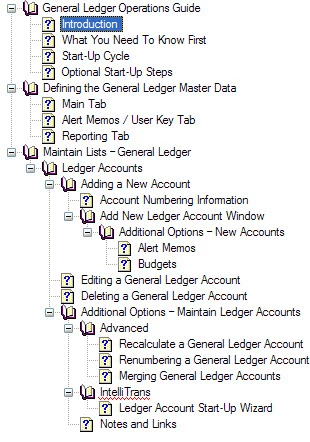
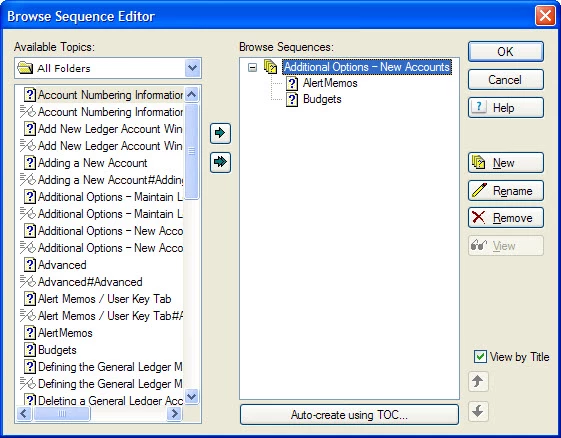
I am not sure what I have done wrong or what I am not understanding.

I tried building a browse sequence by hand but was unclear if should be just one GIANT browse sequence per help file.  If so, when I am ready to so this on the real file, which will be much larger, I would like to have it auto-generate to save time.

Any help, clarification, or slap upside the head would be appreciated

Regards,

Gilley

This topic has been closed for replies.
Correct answer RoboWizard

I think RH is "stuck" on that folder.

Try selecting the folder (as shown in your screenshot) and click Remove. Then click the double green arrow


Hi again

You may certainly try what Leon suggested. However, make note that if you follow that path you will need to manually rearrange the Browse Sequence to match the TOC structure if that's how you want your Browse Sequence to work.

For what it's worth, it's not a folder that is listed. It's a Book in the TOC. And I find it quite odd that it's causing an issue. So here's one other alternative to try.

Create a totally new and different TOC. Auto-create if you have to. Then try creating the Browse Sequence using 0 as the level and see how it goes. My thought here is that you have some odd corruption in the existing TOC structure. Exactly what is unclear but certainly seems to be preventing the Browse Sequences from being built.

Whatever it takes to resolve it, please do take a moment to report back to us what it was so that it may help someone else that could encounter your same situation.

Cheers... Rick

Helpful and Handy Links

RoboHelp Wish Form/Bug Reporting Form

Begin learning RoboHelp HTML 7 or 8 within the day - $24.95!

Adobe Certified RoboHelp HTML Training

SorcerStone Blog

RoboHelp eBooks

1 reply

Captiv8r
Legend
September 29, 2009

Hi there

Indeed the browse sequences are a way to structure a path from topic to topic. They may appear differently based on your output type.

If you want one giant long sequence that matches your TOC, try entering 0 as the level and you will have what you want. Otherwise it will be a bit of hit and miss as far as what you get.

Cheers... Rick

Helpful and Handy Links

RoboHelp Wish Form/Bug Reporting Form

Begin learning RoboHelp HTML 7 or 8 within the day - $24.95!

Adobe Certified RoboHelp HTML Training

SorcerStone Blog

RoboHelp eBooks

Known Participant
September 29, 2009

Rick,

Thanks for the quick reply.  I entered 0 in the level field and received the almost same results.  The difference being that the sequence shows 'Untitled' but contains the same two topics as previously shown in the screen capture.

Any other suggestions?  Since this is just a sample and small help file, I am not opposed to trying different things.

Regards,

Gilley

MergeThis
Inspiring
September 30, 2009

I think RH is "stuck" on that folder.

Try selecting the folder (as shown in your screenshot) and click Remove. Then click the double green arrow