


Known Participant
October 18, 2021
Question

Built-in review feature of RH2020

  • October 18, 2021
  • 10 replies
  • 383 views

Hello again, dear colleagues.

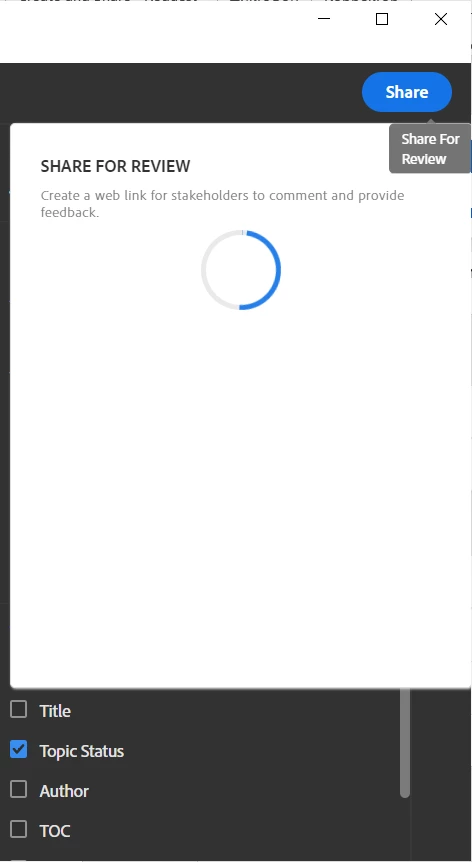
Somebody uses the build-in review feature of RH2020. When I try to use it I just can see endless loader rotation, but not a link to content for review.


The last RH (2020.6.76) version and so on.


    This topic has been closed for replies.

    10 replies

    Peter Grainge
    Community Expert
    Community Expert
    October 21, 2021

    Adobe have assured me that if you have got a review to work on the Windows machine, it must have Creative Cloud Desktop installed.


    Review and Collaboration (adobe.com)

    ________________________________________________________
    See www.grainge.org for free Authoring and RoboHelp Information

    Use the menu (bottom right) to mark the Best Answer or Highlight particularly useful replies. Found the answer elsewhere? Share it here.
    Inspiring
    October 24, 2021

    A little hint from that edge:
    Your corporate IT may have disabled the Creative Cloud space assignment due to unsolved security issues with improper/unreviewed data on a US server site. This is why we are not allowed to use that nice review feature in our RoboHelp.

    Peter Grainge
    Community Expert
    Community Expert
    October 20, 2021

    If you go to Settings > Apps and Features in Windows, do you see this?


    ________________________________________________________
    See www.grainge.org for free Authoring and RoboHelp Information

    Use the menu (bottom right) to mark the Best Answer or Highlight particularly useful replies. Found the answer elsewhere? Share it here.
    Peter Grainge
    Community Expert
    Community Expert
    October 20, 2021

    I don't understand why it is generating from other projects on the same Windows machine. I had the same thought. However, I have been told by the developers to check that it is showing that Syncing is working OK and that is how to check.


    If you don't want to try that, then I can only suggest Support.

    ________________________________________________________
    See www.grainge.org for free Authoring and RoboHelp Information


    Use the menu (bottom right) to mark the Best Answer or Highlight particularly useful replies. Found the answer elsewhere? Share it here.
    Peter Grainge
    Community Expert
    Community Expert
    October 20, 2021

    If it is not installed, you need it. Whilst CC definitely installs it, it can be used without having CC.


    How to download the Creative Cloud desktop app (adobe.com)

    ________________________________________________________
    See www.grainge.org for free Authoring and RoboHelp Information

    Use the menu (bottom right) to mark the Best Answer or Highlight particularly useful replies. Found the answer elsewhere? Share it here.
    AndreyGlAuthor
    Known Participant
    October 20, 2021

    But it works well with the Sample project and some other my projects, too.

    Peter Grainge
    Community Expert
    Community Expert
    October 20, 2021

    Are you sure? I thought it installed automatically with RoboHelp but maybe not. In the Start Menu it will be under A for Adobe.


    Without that About RoboHelp should not have worked either on Windows.

    ________________________________________________________
    See www.grainge.org for free Authoring and RoboHelp Information

    Use the menu (bottom right) to mark the Best Answer or Highlight particularly useful replies. Found the answer elsewhere? Share it here.
    AndreyGlAuthor
    Known Participant
    October 20, 2021

    I installed RH separately without this app. If I'm not mistaken the Creative Cloud Desktop is a part of the Creative Cloud Suite.

    Peter Grainge
    Community Expert
    Community Expert
    October 20, 2021

    Please let us know whether or not that helped.


    • If it did, it's useful to others for that answer to be marked as correct.
    • If it did not, I can make further enquiries.

    ________________________________________________________
    See www.grainge.org for free Authoring and RoboHelp Information

    Use the menu (bottom right) to mark the Best Answer or Highlight particularly useful replies. Found the answer elsewhere? Share it here.
    Peter Grainge
    Community Expert
    Community Expert
    October 19, 2021

    Please check the Sync status in Creative Cloud Desktop. I understand it could be an intermittent issue if some background processes etc were forcefully terminated on the system.


    Open the Adobe Creative Cloud Desktop app from the Start menu and click the Cloud icon. Let us know whether or not there is an issue there.

    ________________________________________________________
    See www.grainge.org for free Authoring and RoboHelp Information
     

    Use the menu (bottom right) to mark the Best Answer or Highlight particularly useful replies. Found the answer elsewhere? Share it here.
    AndreyGlAuthor
    Known Participant
    October 20, 2021

    Actually, I have no the Creative Cloud Desktop app on my PC. I'll try to install it and check.

    Peter Grainge
    Community Expert
    Community Expert
    October 18, 2021

    Which review was done first with this project, Windows or Mac. ________________________________________________________
    See www.grainge.org for free Authoring and RoboHelp InformationMac? 

    Use the menu (bottom right) to mark the Best Answer or Highlight particularly useful replies. Found the answer elsewhere? Share it here.
    Peter Grainge
    Community Expert
    Community Expert
    October 18, 2021

    I realise it doesn't solve the problem but knowing other projects work narrows it down a bit. I'll see what I can find out tomorrow.

    ________________________________________________________
    See www.grainge.org for free Authoring and RoboHelp Information

    Use the menu (bottom right) to mark the Best Answer or Highlight particularly useful replies. Found the answer elsewhere? Share it here.
    Peter Grainge
    Community Expert
    Community Expert
    October 18, 2021

    When you say "Somebody uses the build-in review feature of RH2020" do you mean is anyone using it successfully or are you saying someone else is creating a review that you cannot access?


    Assuming you mean the former, that screen can be slow especially if you have selected a large number of topics in the previous screen but I just tested a small project and it completed.


    Try it with the supplied About RoboHelp sample project and just select a couple of topics to see if that completes.

    ________________________________________________________
    See www.grainge.org for free Authoring and RoboHelp Information


    Use the menu (bottom right) to mark the Best Answer or Highlight particularly useful replies. Found the answer elsewhere? Share it here.
    AndreyGlAuthor
    Known Participant
    October 18, 2021

    In this case, I select only one topic. Yes, it works well in a test project, but it, unfortunately, doesn't solve the problem. Moreover, I want to note that the review in my project works well if I use a Mac version.