


Known Participant
September 12, 2022
Question

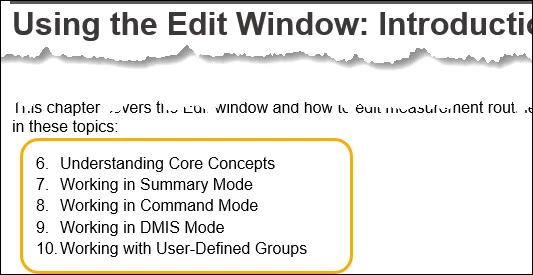
Bulleted lists became numbered lists automatically in the Printed Output

  • September 12, 2022
  • 5 replies
  • 235 views

I ran into a problem where some bulleted lists become numbered lists automatically when I generate the Printed Output from the Printed SSL. It's a strange problem because some lists with identical HTML codes later in the output are fine. It seems to be happening only with the first list of the output.


I added a dummy set of list items above the current ones and this is what I get:
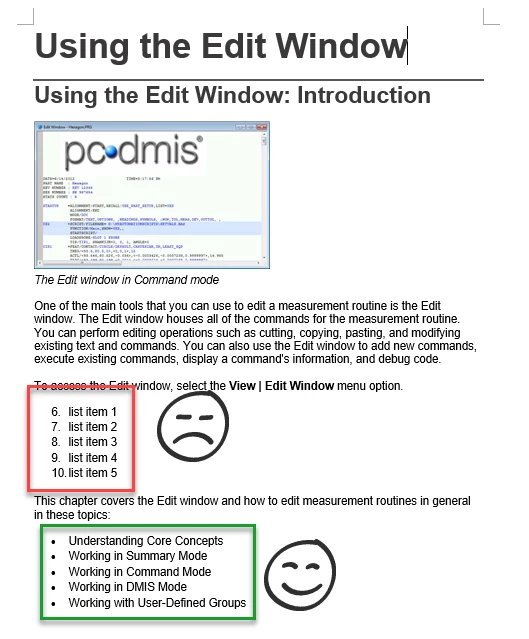
When I change the second set of unordered list items to an ordered list, it comes out as an unordered list.


Here is the code:


<ul style="list-style: disc;">
	<li><p class="BodyText"><a href="Understanding_Core_Concepts.htm">Understanding 
	 Core Concepts</a></p></li>
	<li><p class="BodyText"><a href="Working_in_Summary_Mode.htm">Working 
	 in Summary Mode</a></p></li>
	<li><p class="BodyText"><a href="Working_in_Command_Mode.htm">Working 
	 in Command Mode</a></p></li>
	<li><p class="BodyText"><a href="Working_in_DMIS_Mode.htm">Working 
	 in DMIS Mode</a></p></li>
	<li><p class="BodyText"><a href="Working_with_User_Defined_Groups.htm">Working 
	 with User-Defined Groups</a></p></li>
</ul>

Any thoughts? Please let me know if more details are required.

    This topic has been closed for replies.

    5 replies

    Peter Grainge
    Community Expert
    Community Expert
    September 15, 2022

    I have sent @jigneshashokshah a more detailed reply but the gist of it is the issue seems to be macros in the project. When I generated two topics mapping only to the CSS, they are correct. Also if I change the DOTM used for mapping to a DOTX, the lists are correct.

    ________________________________________________________

    My site www.grainge.org includes many free Authoring and RoboHelp resources that may be of help.


    Use the menu (bottom right) to mark the Best Answer or Highlight particularly useful replies. Found the answer elsewhere? Share it here.
    Peter Grainge
    Community Expert
    Community Expert
    September 15, 2022

    I have 2017, 2019 and 2020 on a machine. See the Contact page on my site and send me one topic that behaves this way and the CSS. I will see what happens on my machine.

    ________________________________________________________

    My site www.grainge.org includes many free Authoring and RoboHelp resources that may be of help.


    Use the menu (bottom right) to mark the Best Answer or Highlight particularly useful replies. Found the answer elsewhere? Share it here.
    Known Participant
    September 15, 2022

    Sure. Thanks Peter.

    I just sent it.

    Peter Grainge
    Community Expert
    Community Expert
    September 13, 2022

    I maybe could understand all lists going to the wrong format but not the first only. There has to be a code difference.


    You refer to Print output. PDF or Word? Do both do the same thing?

    ________________________________________________________

    My site www.grainge.org includes many free Authoring and RoboHelp resources that may be of help.


    Use the menu (bottom right) to mark the Best Answer or Highlight particularly useful replies. Found the answer elsewhere? Share it here.
    Known Participant
    September 15, 2022

    Yes, both do the same thing.


    BTW, I had two versions of Adobe RoboHelp on my computer - 2017 and 2020. Before I or my team installed 2020, it used to work fine for all three of us. But, now, we are all facing the same issue. (We are not sure if that can be the issue)


    So, I uninstalled 2020 and re-installed 2017 with the very latest update.

    And, then tried again, but I still see the same issue.


    I am not sure what else I can try. Any suggestions?


    Peter Grainge
    Community Expert
    Community Expert
    September 12, 2022

    Please confirm that your online outputs are working correctly.


    Is this something that has been working in the past and suddenly gone wrong?


    Do you have all updates applied?

    ________________________________________________________

    My site www.grainge.org includes many free Authoring and RoboHelp resources that may be of help.


    Use the menu (bottom right) to mark the Best Answer or Highlight particularly useful replies. Found the answer elsewhere? Share it here.
    Known Participant
    September 13, 2022


    Yes, it seems online outputs are working correctly.

    Me and my team have not seen in the past. But, maybe, we have overlooked it. I am not sure.

    Yes, it seems all the updates are applied. I am using RH version 13.0.2.334.

    Known Participant
    September 12, 2022

    I forgot to mention that I am using Adobe RoboHelp version 2017 and Microsoft Office 365.