
August 28, 2014
Answered

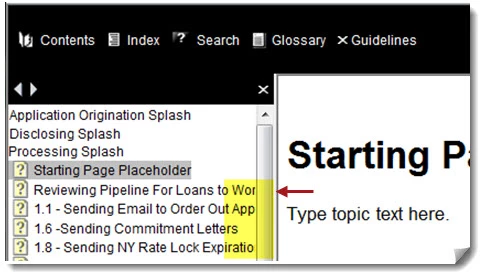
Can anybody tell me how to resize the Index/ TOC pane on a Webhelp Pro generated project?

  • August 28, 2014
  • 2 replies
  • 901 views

The pane on the left hand side of the screen is too narrow and must be enlarged manually. I would like for it to be wide enough when the page is displayed that all entries may be viewed.
Thank you,

Dave

This topic has been closed for replies.
Correct answer

Peter:

Thank you very much!

Hopefully it works on Webhelp Pro.

Dave

>

2 replies

Jeff_Coatsworth
Community Expert
Community Expert
August 28, 2014

Just to confirm – you’re generating WebHelp Pro because you’re hosting it on a RH Server instance, right? If not, then the “Pro” flavours are not designed for you; use the “regular” types of output.

August 29, 2014

Jeff:

Yes, if SharePoint counts as a Robohelp server.

If it's possible to use just Webhelp and still house the project on SharePoint and still have the ability to check-in and out amongst different users, Webhelp will be fine. Does using plain Webhelp v Webhelp Pro make a difference when trying to resize the pane?

Thank you,

Dave

>

Peter Grainge
Community Expert
Community Expert
August 29, 2014

RoboHelp Server is software that sits on a web server and has nothing to do with Sharepoint. RoboHelp can use Sharepoint for source control but that is a very different thing.

It sounds to me like you want Sharepoint for source controlling your projects and then simply want to output WebHelp (not Pro) to a web server.


See www.grainge.org for RoboHelp and Authoring tips

@petergrainge

Use the menu (bottom right) to mark the Best Answer or Highlight particularly useful replies. Found the answer elsewhere? Share it here.
Peter Grainge
Community Expert
Community Expert
August 28, 2014

You will find the answer here for webhelp, not sure if it works for webhelp pro.

http://www.robowizard.com/RoboWizard/NewProject.htm#Downloads/Skinny_on_Skins.htm


See www.grainge.org for RoboHelp and Authoring tips

@petergrainge

Use the menu (bottom right) to mark the Best Answer or Highlight particularly useful replies. Found the answer elsewhere? Share it here.
Correct answer
August 29, 2014

Peter:

Thank you very much!

Hopefully it works on Webhelp Pro.

Dave

>