
Inspiring
May 4, 2020
Answered

Can I add a custom button to email the topic page?

  • May 4, 2020
  • 14 replies
  • 1360 views

I"m trying to add a custom button to a responsive HTML5 layout, and trying to use the script referenced here in the Javascript code:

https://community.adobe.com/t5/robohelp/how-can-i-add-a-button-to-email-a-link-to-the-current-topic/td-p/10165717?page=1


Here's the code I enter:

window.location=('mailto:someone@theirdomain.com?Subject=Useful Information&body=This page might help: ' + window.parent.frames[1].frames[1].document.title +' ' + escape(window.parent.frames[1].frames[1].document.location))


But each time I save the skin, the name of the new custom button reverts back to "button3" and the code I pasted into the OnClick field disappears. 
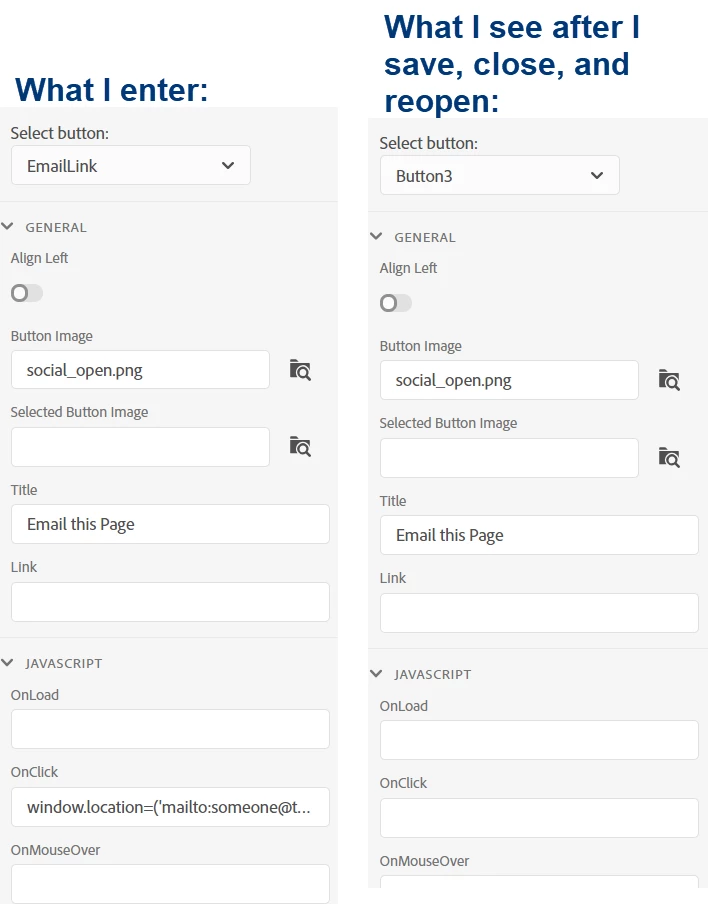
 

Can anyone provide some guidance?

This topic has been closed for replies.
Correct answer abigailatssc

Peter and I spoke, and his advice is what worked - the Javascript field for the custom button won't stick unless you completely remove what was there before and then paste in an entirely new string of text. As long as I've done that, it appears to save my changes.

14 replies

Community Expert
May 5, 2020

Disclaimer: I know enough to get myself in trouble without any read idea what I'm doing. And all of this seems to be undocumented. So I'm just shoving stuff in until something looks right in a specific situation. 🙂


But, you could try this and see if it works:

window.location.href = "mailto:someone@somedomain.com?subject=Issue in topic&body=Topic path is " + rh._.parentPath() + rh._.hashParam('t'); return false;

Peter Grainge
Community Expert
Community Expert
May 4, 2020

Sorry but I can't help you with that one. The full URL on the end users machines could be different unless you host the help on your web server. I think the URL was designed that way so that in the email you know where to look in the project. That works for everyone rather than just where the help is on a web server.


Use the menu (bottom right) to mark the Best Answer or Highlight particularly useful replies. Found the answer elsewhere? Share it here.
Peter Grainge
Community Expert
Community Expert
May 4, 2020

Also, which skin and do you have all updates applied. You should be on 2019.0.12


Use the menu (bottom right) to mark the Best Answer or Highlight particularly useful replies. Found the answer elsewhere? Share it here.
Peter Grainge
Community Expert
Community Expert
May 4, 2020

I see the button name problem but that shouldn't affect it working. I cannot replicate the problem of the code going AWOL but it's not the right code.


See this post in the other thread. Try that and see if it sticks with the right code.


https://community.adobe.com/t5/robohelp/how-can-i-add-a-button-to-email-a-link-to-the-current-topic/m-p/10165732#M122830


Use the menu (bottom right) to mark the Best Answer or Highlight particularly useful replies. Found the answer elsewhere? Share it here.
Inspiring
May 4, 2020

This took care of it. You're right, the button name changes, but it doesn't affect funcitonality.


Do you happen to know if there's way I can include in the body of the email the entire URL?

I did a little experiment with the code below, but then the toolbar button didn't work at all.


window.location.href = "mailto:someone@somedomain.com?subject=User Guide Topic&body=" http://www .ourdomain.com/"+rh._.hashParam('t'); return false;