

Can I change the background color a table lies on?
Hi guys, I recently (about 2 months ago) started working with RoboHelp 2015 V12.0.2.384. I was employed as a Technical Document Writer and RoboHelp was given to me to use. So far, so good. I love working with RoboHelp (bar a few tiny issues) and I love learning as I go along. Usually I can figure stuff out using online HTML code to fix what I need to do (like creating tabs), but this one issue has me stumped. Here is the breakdown:
I'm making tables to summarize related data. Now the tables are customized obviously to comply with company fonts and colors, but here I have an issue with an option I can't seem to change.
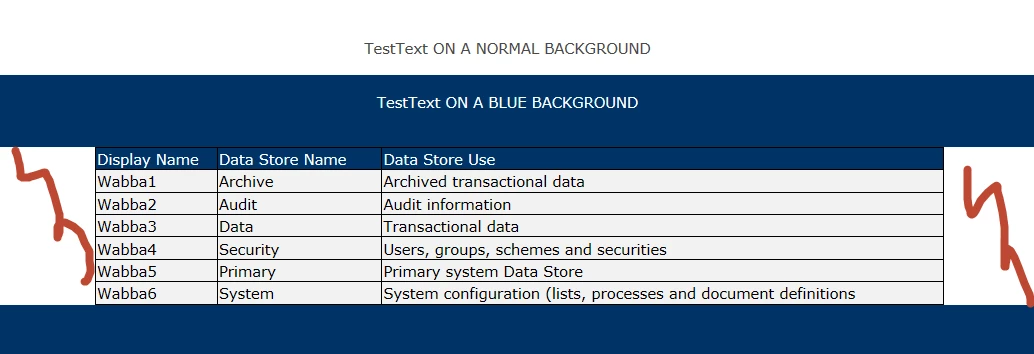
Placing a table allows me to change the font, font size and font color. It also allows me to change the background colors of individual cells, which is working perfectly. However, placing a table on a colored background gives the table two large white margins on either side which looks crap. Is there a way I can fix this? I can't change the entire topic's background color/shading, because it doesn't solve my issue.
Question: How can I just change the background color or shading of a small part of a topic? Here's an example of what the table looks like (I marked the white spots I have an issue with with red squiggles):
Can anyone assist?


 AdChoices