
Can I copy or export the data displayed in Topic List Pod?
Using: RoboHelp 11 on Windows 10.
I inherited a very large help project that contains a lot of information that does not need to be in the help. The project contained 1 TOC, and we have determined that some entire sections of the TOC can be removed. I have also discovered, however, that many topics are linked to multiple places in the TOC. When I open the HHC file for the full TOC in Notepad++, there are over 40K lines when all is expanded.
I have created 2 TOCs from the original (OK, I've really made 5, but 2 is fine for the purposes of this question). 1 has all of the books I want to remove, and the other has the books to keep. I have adjusted my Topic List pod to display the File Name, Title, and TOC Name.
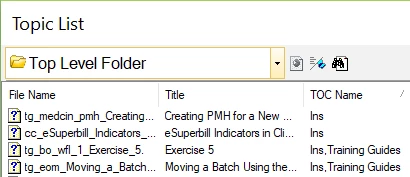
Using this, I feel I can safely delete all files that are only in the Ins TOC, but not the ones that in both Ins and Training Guides TOCs. I also want to delete the files using Windows Explorer and not have the RH Project open while I do this. <Please tell me if this is the wrong approach.>
Is there a way to export the data showing in this pod (name, title, toc) to Excel? I want to be able sort it and the mark the files as I delete them (and maybe add comments for when something breaks down the line).
I've tried the various reports available. I can Select All, but there is no Copy command available to then allow me to paste it into Excel. I've search these forums, but have not found where anyone has asked this question.
Thank you for any assistance you can provide.


 AdChoices