


can i customize the indigo skin?
With FM 2019, I used the Publish feature to publish my Help to a Responsive HTML5 output skin called Indigo. I customized the skin's buttons and set the text colors to my company's brand via the Settings.sts edit function. Output looks great, so far so good. Each TOC item (icon) picked up a heading 1, cool. Now my manager wants me to customize the color of each icon (product line) to coincide with the brand product colors. I dont see a way of doing this with the FM Publish editing tools, which allow you to customize the TOC icon colors as a group, but not individually. Potential solution - RoboHelp 2019. I'm thinking the RoboHelp tools may enable me to go this extra mile in skin customization. Is there a way to import my finished Help into RH and then do this fine tuning edit on the Indigo Responsive HTML5 skin? My goal here is pretty simple, customize the individual TOC icons, as seen in the below example, from image 1 to image 2:
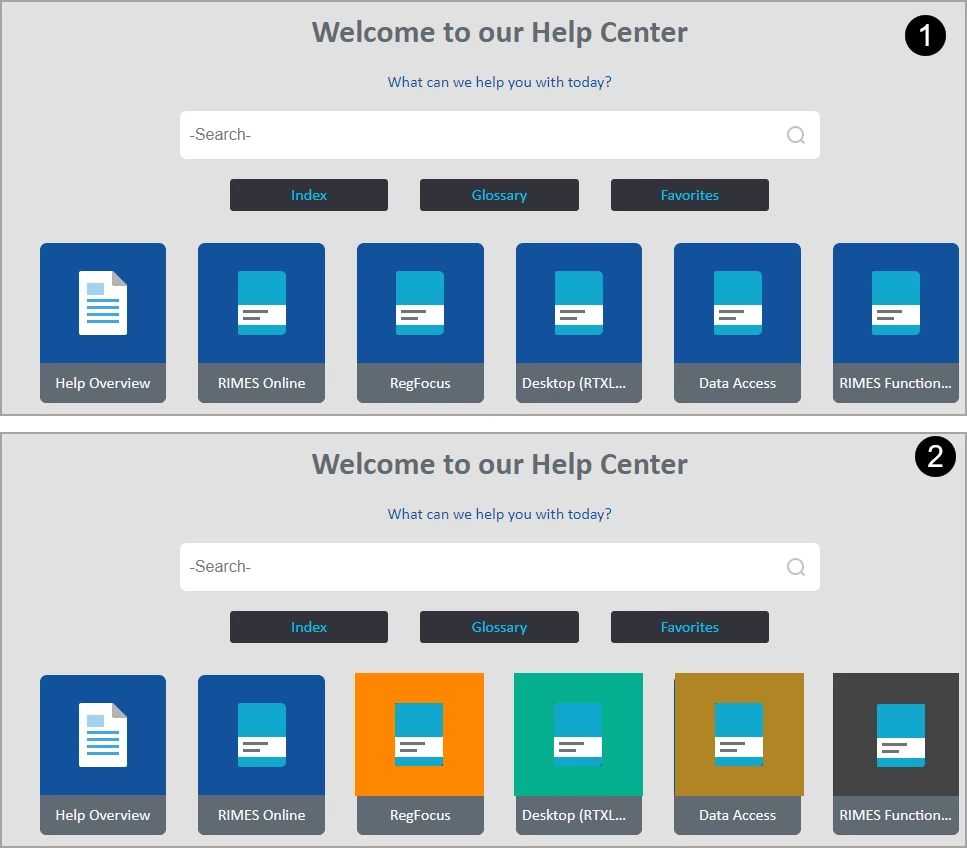
Thanx for any advice/help anyone may provide.
Regards,
Bill
 AdChoices