
Known Participant
September 8, 2011
Answered

Can I display a topic's content beneath a twisty?

  • September 8, 2011
  • 1 reply
  • 1475 views

Hello, I am having a number of issues:

1. I am trying to use twisties in RH 8, and all the instructions I find online haven't helped. The functionality seems to be missing.

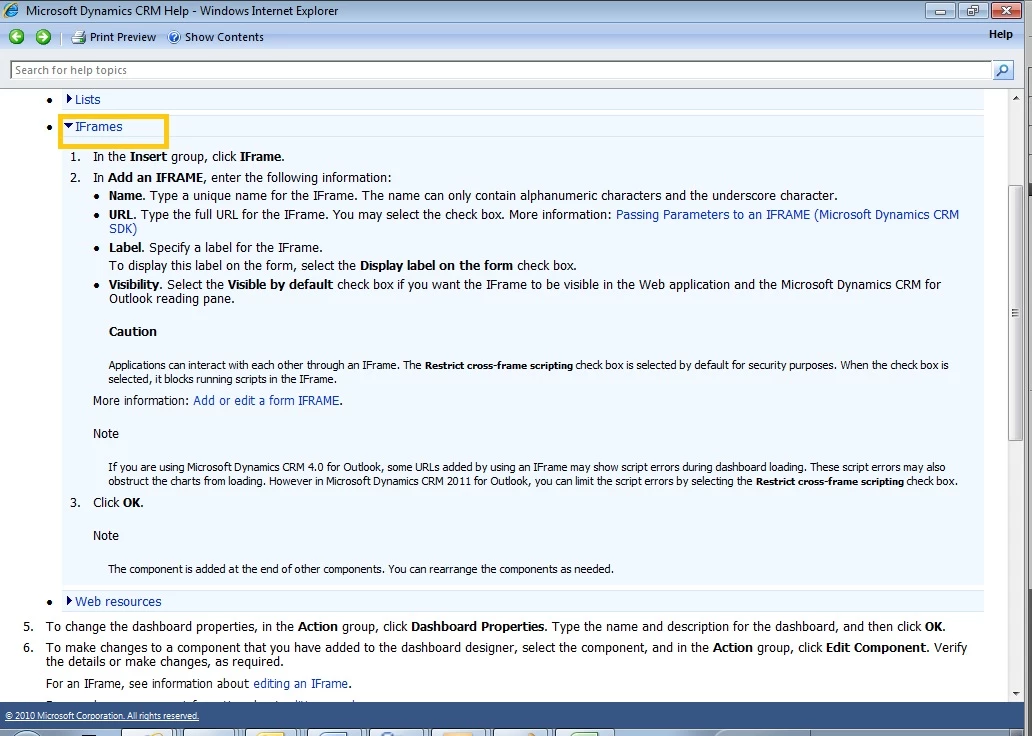
2. I would like to be able to link topic content to a twisty, so that when the user clicks to drop down, an entire topic shows beneath. See the example below. How can this be done?

Thanks in advance!
    This topic has been closed for replies.
    Correct answer Willam van Weelden

    What you describe is a Dropdown hotspot (that can also have a twisty) but the difficulty is you are wanting that content to be another topic.

    What is the problem with a conventional dropdown where when the hotspot is clicked, additional text is displayed below the hotspot in the way you want?

    Take a look at Twisties 2 and click the demo.

    http://www.grainge.org/pages/authoring/twisty/twisty.htm

    It sounds like what you want other than you saying the content has to come from another topic.


    See www.grainge.org for RoboHelp and Authoring tips

    @petergrainge


    Hi,

    You can add an iframe in a dropdown. Insert > HTML > iFrame. Link that to the topic you want. You will have to play around with the size of the iFrame and you may get scroll bars when the iFrame is too small.

    Greet,

    Willam

    1 reply

    Peter Grainge
    Community Expert
    Community Expert
    September 8, 2011

    Difficult to comment without knowing what you have looked at.

    Try the RoboHelp Tour on my site for the twisties method provided by RoboHelp and look at Twisties for another method that allows you to select which dropdowns have twisties.


    See www.grainge.org for RoboHelp and Authoring tips

    @petergrainge

    Use the menu (bottom right) to mark the Best Answer or Highlight particularly useful replies. Found the answer elsewhere? Share it here.
    PanitzkeAuthor
    Known Participant
    September 9, 2011

    Thanks Peter,

    I couldn't find instructions for exactly what I am trying to do on your website.

    I don't want to enter content into the expanding text field, then format it. I want to place content from already formatted topics into the expanding text.

    In other words, rather than a user clicking a link and it opening up a new page of content, I would like that content to appear inline on the same page, where it can be minimized/collapsed again when the user has the information they need.

    Does this make sense?

    If there is information on your website for this, please post a direct link.

    Thanks very much!

    Peter Grainge
    Community Expert
    Community Expert
    September 9, 2011

    When a user is in a topic you can have hotspots that:

    Display text below the hotspot - Dropdowns

    Display text alongside - Expanding text

    Change the topic displayed - Links

    I think you want the user to click a hotspot and then have the content of another topic appear below the hotspot, correct?


    See www.grainge.org for RoboHelp and Authoring tips

    ringe

    Use the menu (bottom right) to mark the Best Answer or Highlight particularly useful replies. Found the answer elsewhere? Share it here.