
shannonmk
Inspiring
June 8, 2016
Answered

Can I move image files from inside RH

  • June 8, 2016
  • 1 reply
  • 383 views

First off, I know I did it wrong. Now, I'm trying to clean up my mess in the most time efficient method possible.

I inserted images with cut and paste.  The images were stored in the root of the project, and not in the Images folder as I expected.  I tried to drop and drag inside the Project Manager, but the files won't budge.

Next, I moved the file in File Explorer (outside RH) and then manually updated the link.  That works, but it is time intensive.  Is there an easier way?

Shannon
This topic has been closed for replies.
Correct answer Captiv8r

Hi there

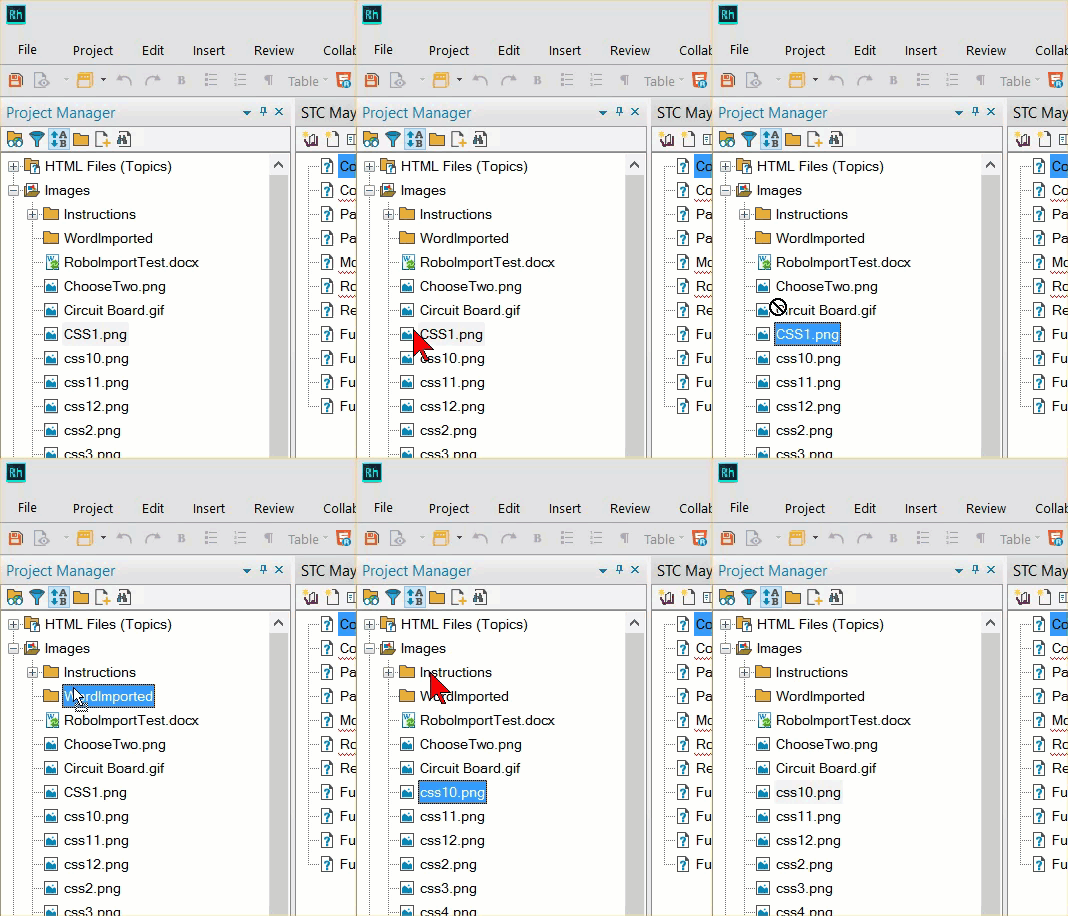
Are you trying to drag the image as shown below?

Cheers... Rick

1 reply

Captiv8r
Captiv8rCorrect answer
Legend
June 8, 2016

Hi there

Are you trying to drag the image as shown below?

Cheers... Rick

shannonmk
shannonmkAuthor
Inspiring
June 8, 2016

Grrr, yes.  I just didn't click and drag far enough up the directory tree.  Typical user error.  I have a nut loose on my keyboard. :-) 

Thanks for keeping me straight, Rick.