
Question
Can I overwrite RoboHelp 2015 automatic script edit in HTML?
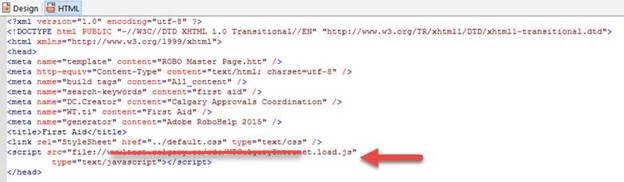
I have a script for webtrends tracking that I need to add to my master page header in RoboHelp 2015. The script does not have "https:" or "http:". It simply has "//www.abc.ca..." and it is supposed to automatically pick up both http and https.
Unfortunately after I enter in the script and save the master page, RoboHelp automatically adds "file:" to the front of the "//www.abc.ca..". As soon as this happens, both the tracking does not work and the page becomes unbearably slow as it is trying to find a file that does not exist.
Anyone seen this behavior before? Ideas on how I can overwrite the automatic script edit that the program is doing?


 AdChoices