Known Participant
May 31, 2023
Answered

Can I use both RoboHelp 2020 and 2022 on one PC?

  • May 31, 2023
  • 1 reply
  • 182 views

I am a RoboHelp 2020 user. Can I install 2022 without uninstalling RoboHelp 2020 and use both?

    This topic has been closed for replies.
    Correct answer Peter Grainge

    You can install many versions of RoboHelp but you can only open a specific project in one version. Once upgraded, you should not go back to an earlier version as it risks breaking the code.


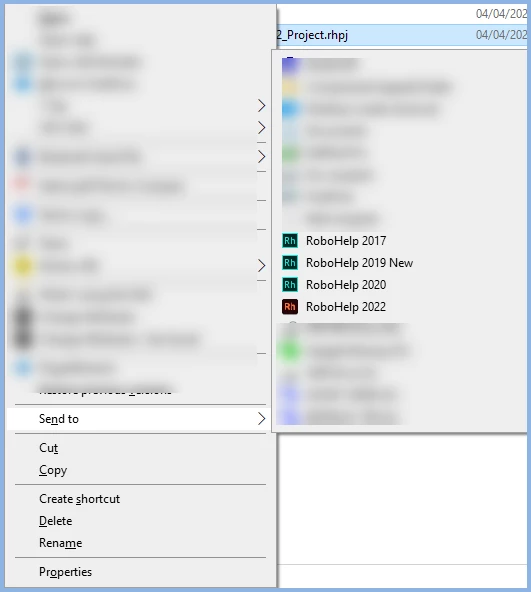
    I use several versions to help with forum questions that can be about a specific version. I add the versions to my Send To menu and then right click a project to open it in the desired version.


    If you have a reason to keep both, that will work but you have to organise your projects to know which need which version. If you only have one project, there is no point in having multiple versions of RoboHelp.

    ________________________________________________________

    My site www.grainge.org includes many free Authoring and RoboHelp resources that may be of help.


    1 reply

    Peter Grainge
    Community Expert
    Peter GraingeCommunity ExpertCorrect answer
    Community Expert
    May 31, 2023

    You can install many versions of RoboHelp but you can only open a specific project in one version. Once upgraded, you should not go back to an earlier version as it risks breaking the code.


    I use several versions to help with forum questions that can be about a specific version. I add the versions to my Send To menu and then right click a project to open it in the desired version.


    If you have a reason to keep both, that will work but you have to organise your projects to know which need which version. If you only have one project, there is no point in having multiple versions of RoboHelp.

    ________________________________________________________

    My site www.grainge.org includes many free Authoring and RoboHelp resources that may be of help.


    Use menu (bottom right) to mark as Best Answer or to Highlight particularly useful replies. Found the answer elsewhere? Share it here.



