


Inspiring
April 12, 2022
Question

Can someone PLEASE tell me how condition tags are logically applied in RH 2020

  • April 12, 2022
  • 3 replies
  • 265 views

I've been banging my head against a wall for days. Either I TOTALLY misunderstand how they work, or RH is buggy as heck (I can already say it is buggy in the application of tags ... drag and drop onto text is useless, and I end up doing half the work in the source view).


RoboHelp 2020 - Latest build (2020.7.46)

Given the following diagram, I have:
Two "Program Name" tags

  • Program 1
  • Program 2

Five internal "Audience" tags

  • BSS
  • Carrier Services
  • Contact Center Ops
  • Customer Service (CS)
  • IT Sys Admins

One external "Audience" tag.

  • Contact Center Vendor

Given that:

  1. At the topic level, all necessary tags are applied (all audience tags and one program tag).
  2. At the content level, given all tagged groups have access to the topic, I would expect all non-tagged text to be available to all "Audience" tags.
  3. At the content level, I would expect all specific "Audience" tags to be applied appropriately - so red tag "BSS_Admins" for example would see all un-tagged text PLUS the red-tagged text only.
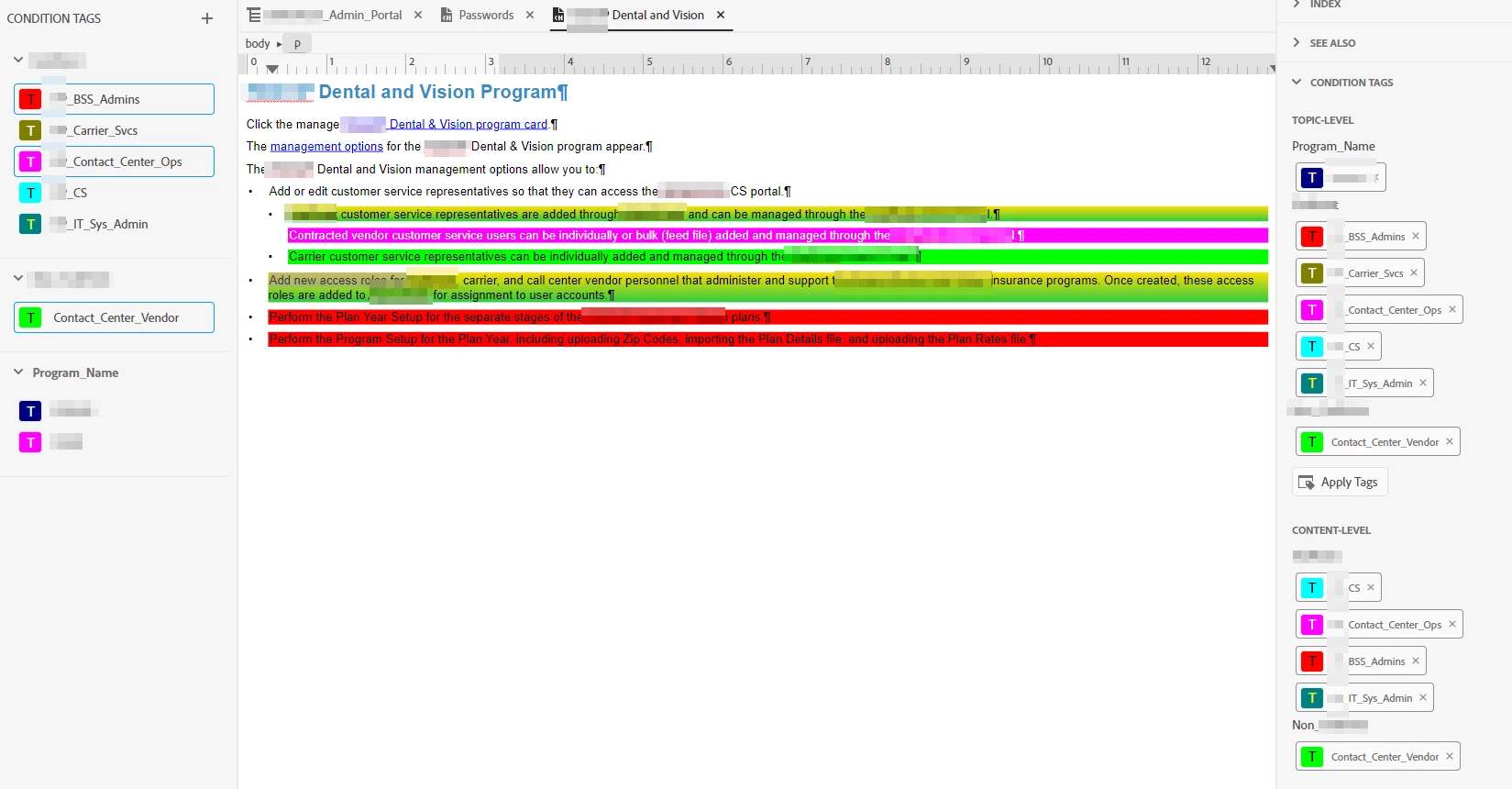
 

Needless to say - my output does not work as expected. Here, for example is output given scenario 3 above, with the Program (Z) and Internal Audience filter (BSS) selected. Text that has been specifically tagged for other audience groups is still displayed.
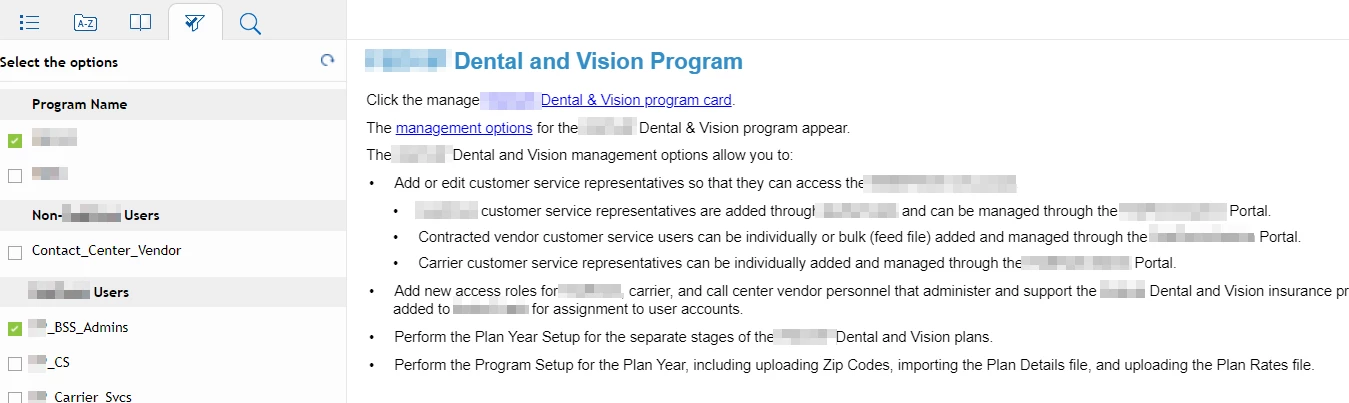
Can someone PLEASE tell me what I'm doing wrong, or what I don't understand? Thanks!


    This topic has been closed for replies.

    3 replies

    Community Expert
    April 13, 2022

    The tag bar at the top of the topic can provide more control over what the condition tag is applied to. For a whole paragraph, click inside the paragraph (don't select any text), then right-click on the p tag and select Apply Condition Tags. Similarly for a div, click anywhere inside the div, then use the tag bar. For an image, click on the image, then use the tag bar to apply the condition to the img tag. I haven't tried it on a dropdown, so you'd have to experiment.

    Jeff_Coatsworth
    Community Expert
    Community Expert
    April 12, 2022

    What's your filtering look like in the Preset? I beleive you need to do excludes - see https://www.grainge.org/pages/authoring/rh_tour/rh2020/single_sourcing/single_sourcing.htm

    Inspiring
    April 12, 2022

    Thanks for the response. I don't have any condition expressons set ... all I am interested in is using the tags "on the fly" to display or hide onscreen text - which I thought fell under "Dynamic Content Filtering". I do note that Peter says "What  you must not do (for DCF) is apply a condition tag at both topic and content level; tags must be applied at one level only" ... which I obviously have not done.


    Inspiring
    April 12, 2022

    Andddd... that seems to work much better. 

    Inspiring
    April 12, 2022

    Sorry - as a follow-on question, can a tag be applied to a <p> or <span> tags only, or can they also be applied to <img> or <div> tags for drop-down text, etc? Thx.