
Known Participant
December 4, 2019
Answered

Can't change the font of a heading style

  • December 4, 2019
  • 2 replies
  • 552 views

I am using new RoboHelp 2019 and all of my patches are up to date. I have a style called h1 for heading 1, and I can't change its font. When I click the drop-down list box arrow next to the field something flashes up but then nothing happens. Surely this is a fairly standard/common thing to want to do?


Here is a picture:
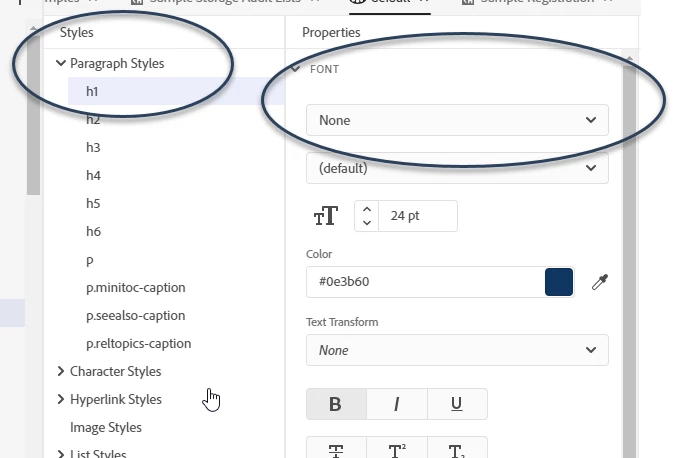
 

I have looked in the forums and help but can't find an answer. Is this a bug?

This topic has been closed for replies.
Correct answer Peter Grainge

It's not a known bug. First thing to do is try another project. Open the RoboHelp Reimagined sample project and try there. That's a known quantity. Post back what happens there.


www.grainge.org

2 replies

Peter Grainge
Community Expert
Community Expert
December 4, 2019

Not an expected result but anything that works!


www.grainge.org

Use the menu (bottom right) to mark the Best Answer or Highlight particularly useful replies. Found the answer elsewhere? Share it here.
Peter Grainge
Community Expert
Peter GraingeCommunity ExpertCorrect answer
Community Expert
December 4, 2019

It's not a known bug. First thing to do is try another project. Open the RoboHelp Reimagined sample project and try there. That's a known quantity. Post back what happens there.


www.grainge.org

Use the menu (bottom right) to mark the Best Answer or Highlight particularly useful replies. Found the answer elsewhere? Share it here.
ClareMilAuthor
Known Participant
December 4, 2019

Thanks Peter, I selected it there and now I can select it in my project.