Known Participant
June 10, 2009
Answered

Can't delete default TOC

  • June 10, 2009
  • 2 replies
  • 2497 views

I created a new RH project and it created a default TOC. Then I created a new TOC and I can't delete the default one and that's the one that keeps displaying. Any ideas?

Thanks.

DC

This topic has been closed for replies.
Correct answer RoboWizard

Here it is.


Hi again

Arrrgh! I'm so sorry! Silly me. I'm mixing up my RoboHelp versions.

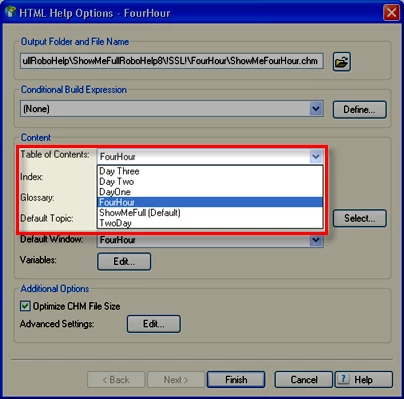
I just checked my version 7 and it doesn't seem to offer any ability to nominate a different TOC as the default. RoboHelp 8 does.

Again I apologize.

When you edit the layout properties, you are given the option of choosing the TOC to use with the layout. Does this help?

Cheers... Rick

2 replies

Inspiring
June 11, 2009

Diane,

This forum is regularly scanned by spam-harvesters. I suggest you edit your posts to remove your email address.

RoboWizard
Inspiring
June 11, 2009

Hi there

An excellent suggestion for sure. But I'm afraid it will only apply to posts made from here going forward. A post is only editable for about 15 minutes after you initially post it.

Cheeres... Rick

MergeThis
Inspiring
June 10, 2009

In Project Manager, Table of Contents: 1) select your new TOC; 2) right click; and 3) select Set as Default.

Then, you could do the same thing with the old TOC but select Delete in step 3.

Good luck,

Leon

lopeypAuthor
Known Participant
June 10, 2009

Hi,

I don't get the set as default option.  I only get Edit.  View and Delete are grayed out. I don't see set as default.

RoboWizard
Inspiring
June 10, 2009