
Inspiring
July 29, 2015
Answered

Can't delete files. System complaints of "Invalid Parameter"

  • July 29, 2015
  • 2 replies
  • 749 views

Hey folks,

Today, when trying to delete a file, my system began complaining of an "Invalid Parameter". After this, although links to the file are deleted, the file still appears in the Project view. Additionally, when trying to check in my changes, the system complains that the "ImageSize.Width" parameter is set to 272, and the value should be from 1 to 256.

But I haven't touched any images today. In fact, all I've done today is work on a Table of Contents and Conditional Build Tags. This error is brand new, and I'm not even sure where it's coming from. (I did a search for "ImageSize.Width" and didn't find anything in any file.)
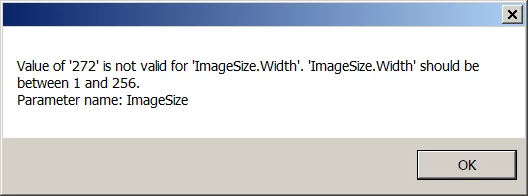
This error appears every time I try to delete a file now. I've tried this with 4 different files, and it happens with all. After the error appears, I can't even check in my changes to my versioning system (TFS); I have to restart the application to check changes in. Additionally, the file remains in the project manager.

Any help is appreciated.

This topic has been closed for replies.
Correct answer GnorbX

The answer is to go to the Windows display settings in the Control Panel and change DPI font to 96 (100%).

Silly as it sounds, that fixes the issue.

2 replies

GnorbXAuthorCorrect answer
Inspiring
August 6, 2015

The answer is to go to the Windows display settings in the Control Panel and change DPI font to 96 (100%).

Silly as it sounds, that fixes the issue.

Willam van Weelden
Inspiring
July 30, 2015

Are you using Source Control? Have you run any kind of script lately?

Have you tried removing the CPD before opening the project?

GnorbXAuthor
Inspiring
July 30, 2015

Thanks for replying, William.

- Using TFS.

- Haven't run any script.

- Deleted CPD, but still happens.

I was finally able to delete a file, but I still get the error. This is what I have to do:

  1. In RoboHelp, in the Project view, right-click on the file and select "Delete". The file will be checked out as normal, but then will throw an "Invalid Parameter" error. The file remains in the Project List, but with a checkmark indicating that it has been checked out.
  2. I right-click on the file again and select "Delete". I get a warning about there being a conflicting change that is incompatible.
  3. I try to delete another file. That's when I get the error shown at the start of the thread. The file is checked out (little check mark), but nothing else happens.
  4. Trying to do a "Check in All Changes" via RoboHelp shows ImageSIze error again.
  5. I save and close RoboHelp.
  6. I go to TFS and check in pending changes that way.
  7. After opening the project again, the first deleted file is gone. The other file remains.

Clearly, this could probably be done with fewer steps, this way I show you where i'm having the issues. As I said, this started happening just a couple of days ago. No changes were made to the file other than changes to the TOC. (We're actually working on 2 different TOCs at the same time, and both of them received changes.)

Willam van Weelden
Inspiring
July 31, 2015

Hi Norbert,

You can probably still check out topics and edit them? Do you also get this error message when you try to check in changes? And can you check in your changes using Visual Studio instead of RoboHelp?

Can you try uninstalling and reinstalling the MSSCCI provider?

Also, please log a bug with Adobe: Feature Request/Bug Report Form

Perhaps this will also help: Another user had the same problem and she seems to have found a workaround: ImageSize.Width error when checking-in to source control