
April 26, 2019
Answered

Can't open select TOC pages after opening RH 11 .xpj in RH 2017

  • April 26, 2019
  • 1 reply
  • 995 views

I've recently opened a project in RH 2017 but prior to loading it into RH 2017, my team has been using RH 11 for online help. When I open the .xpj file in RH 2017, some of my TOC pages are not able to be opened. The TOC pages that aren't able to be opened show up with a red x, as shown below.
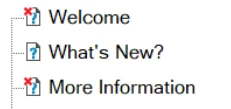
When I attempt to open that specific TOC page, it takes me to the TOC Page Properties window.

Additionally, the logos/pictures I've added into those specific pages (the ones I can no longer open in RH 2017) show a s a broken link after compiling. Is there any way that I can make the TOC pages editable without deleting each and re-adding them?

This topic has been closed for replies.
Correct answer Peter Grainge

There are thousands. But I was able to restore the broken links from within RoboHelp.

I have an unrelated question: how can I hide certain topics from my output? For our minimum viable product for our beta test group, we only want them to see certain topics. Without deleting the topics I don't want the users to see, is there a way to hide these topics in 2017?


Create a conditional tag called say Beta. In Topic List apply that tag to all the topics to be excluded. When you generate, create an expression NOT Beta and those topics will not be in the build.

You could create a separate output as a duplicate and just change the build expression so that you have one output for general use and one for the testers to save keep changing the expression, or forgetting to.


See www.grainge.org for free RoboHelp and Authoring information.

@petergrainge

1 reply

Captiv8r
Legend
April 26, 2019

Hi there

I'd be looking closely at the properties for each page in the TOC entry. Then look at the project and see if the topic exists.

Cheers... Rick

April 29, 2019

Hi Rick Captiv8r,

What specifically should I be looking for inside the TOC properties? If they do exist, is there a workaround for editing them/removing the red x? If they don't exist, what are my options?

Thanks for all your help!

Captiv8r
Legend
April 29, 2019

Hello again

When you examine the properties of the TOC entry, you should see something like this:

You want to pay close attention to what you see in that "Liink to:" field. Then ensure the topic is actually IN that location and is named what RoboHelp is expecting.

The file could have been moved or renamed behind RoboHelp's back and that is one way this can happen.

Cheers... Rick