
Participant
March 14, 2014
Question

Can't resolve broken links

  • March 14, 2014
  • 2 replies
  • 624 views

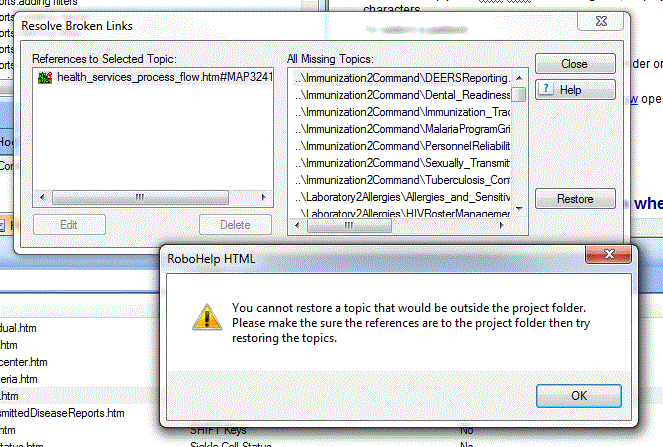
Hello everyone! I am hoping that someone will be able to assist me. I am working in RH 9 and i have received the following error when i select to resolve my broken links. "You cannot resore a topic that would be outside the project folder. Please make sure feferences are to the project folder then try restoring the topics." Can anyone assist with this error? I have checked my folders and the source and line files are in the correct folders. Thank you in advance.
    This topic has been closed for replies.

    2 replies

    Paula R. Stern
    Participating Frequently
    March 17, 2014

    When you say that you checked, what do you mean? If you mean that you see them when viewing the folders in Windows Explorer - it could mean for some reason that RoboHelp "lost" the connection with in the project itself. I have seen this happen in the past - no idea why - and what I've done to correct it was simply to "re-import" the files -even though they exist in the folder.

    DId you move the files within the project?

    In any case, try File > Import and select the HTML files and see if this "fixes" the broken links.

    Peter Grainge
    Community Expert
    Community Expert
    March 17, 2014

    Is the source topic showing in Project Manager or just Windows Explorer? If only the latter, you need to reimport it into the project first.

    You also refer to "line files". What are they?


    See www.grainge.org for RoboHelp and Authoring tips

    @petergrainge

    Use the menu (bottom right) to mark the Best Answer or Highlight particularly useful replies. Found the answer elsewhere? Share it here.
    Paula R. Stern
    Participating Frequently
    March 17, 2014

    oops - just saw your response...yeah, what he said...