


Can't seem to make a simple test index for RH2022
I have had continuing trouble figuring out the "reimagined" UI. My situation is complicated by the fact of having migrated many large CHM projects from X3 to 2019 (Classic) to 2022, and continue to trip on unexpected failures/short-comings/unexpected stuff. The latest has to do with the Index. I will not torture the reader by explaining all the steps I've taken thus far; rather, note that I have resorted to creating a simple test project to see what I can see. The most straightforward, but possibly uninformative what I can demonstrate my issue is via the following screen shots. Here are a couple of factoids that may help position the reader.
- created a new project using RH2022 and created a preset for type Microsoft HTML Help (aka CHM)
- note that the the new project contains an auto-generated named First Topic
- navigating to Author/Index, I click on the plus (+) sign at the top right of the Index panel and enter text "First"
- I then click on the elipsis (...) at the end of the newly inserted entry "First" in the Index panel, choose "New Topic", select the "First Topic" topic and click "Link".
- I then generate the output for the CHM preset, launch the CHM, and find that a single entry - "First" does appear on the CHM's Index tab. So far, so good.
- I then duplicate "First Topic" and rename the duplicate "Second Topic", change all the "first"s to "second"s, and save the edited "Second Topic"
- Next, I navigate back to Author/Index, and find that it's added "Second Topic" under the "First" keyword which is not what I want, and is certainly due to having duplicated/copied "First Topic", so I Remove that entry from the Index.
- I then click on the + sign in the Index panel and type in "Second" (ie a second keyword) after eventually getting it to the root level, then select the new keyword and add a Link to the "Second Topic" similarly to the way I did it for the first one, save all, regenerate the CHM preset output, launch it, and see this:
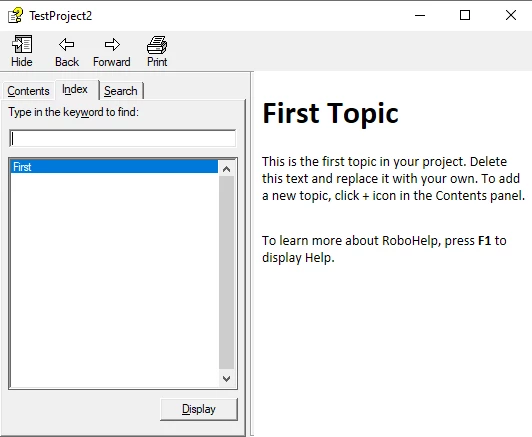
What did I do wrong?



 AdChoices