
Participant
April 28, 2011
Question

Cannot Install AIR after finished created AIR through Robohelp

  • April 28, 2011
  • 2 replies
  • 965 views

Hi, I am new to RoboHelp, and i need to create a help system, which I have created in RoboHelp, but I failed to install the AIR i created,

it might be just me doing something wrong,

so far, i have created ahelp page using the blank template,

after finished creating, I go to "single sources layouts" > "adobe Air"

Then after i clicked finish, it started generating the AIR file, but I received a message as shown below,
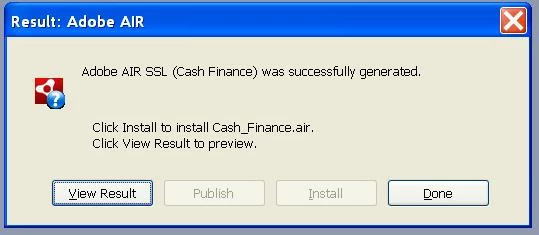
I need to install it to allow multiple computers to be able to use this help system, but as shown above,

I cannot click Install, I have tried using admistrator account and still fails to install,

now that i am stuck in this. And wondering if I need to install some AIR program for me to be able to install this?

Thanks

    This topic has been closed for replies.

    2 replies

    Participant
    May 5, 2011

    Thank you for your help,

    I am able to use robohelp to install AIR after i downloaded AIR and install the AIR program

    Peter Grainge
    Community Expert
    Community Expert
    April 28, 2011

    In the layout is the folder where you create the .AIR file on you PC or a network drive? It must be local.

    What version of RoboHelp are you using? Please include that whenever you start a thread. See Before You Post in sticky topics.


    See www.grainge.org for RoboHelp and Authoring tips

    @petergrainge

    Use the menu (bottom right) to mark the Best Answer or Highlight particularly useful replies. Found the answer elsewhere? Share it here.
    Participant
    April 28, 2011

    I am using "Adobe RoboHelp 8 HTML"

    And I am new to this program, so I am not sure if it is local...

    So what can i do to make sure it is local?

    btw, I am using a PC, so I assume it is local?

    and do i need to have adobe AIR to be able to click install?

    Thanks

    Peter Grainge
    Community Expert
    Community Expert
    April 28, 2011

    See the Output Location field when you generate the help.

    There is an article on my site that covers creating AIR help and it describes all the fields. Check that you are comleting the configuration details correctly.


    See www.grainge.org for RoboHelp and Authoring tips

    @petergrainge

    Use the menu (bottom right) to mark the Best Answer or Highlight particularly useful replies. Found the answer elsewhere? Share it here.