

Jared Hess
Legend
July 10, 2020
Answered

Cannot re-order sections in printable layout

  • July 10, 2020
  • 3 replies
  • 256 views

RoboHelp 2017 - latest version

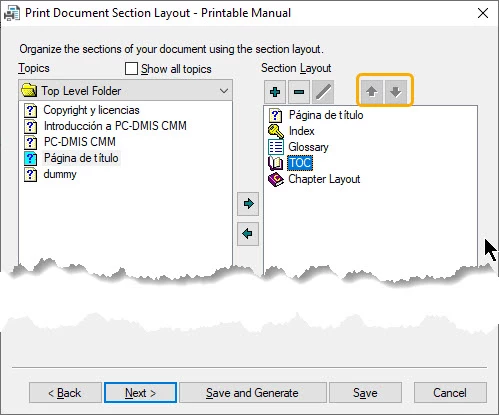
Notice that the up and down arrows on the right pane of the Print Document Section Layout dialog box are both grayed out. The same thing happens if I select Chapter layout. If I choose Glossary or Index only the up arrow is visible and the down is grayed out. After 16 years of working with RoboHelp, I don't think I've never encountered this before... Thoughts?
This topic has been closed for replies.
Correct answer Jared Hess

I think I figured it out. If I remove everything but chapter layout and add them back in one at a time reordering after each one, it works. If you try to add them in all at once and re-order you can end up with un-clickable buttons.

3 replies

Peter Grainge
Community Expert
Community Expert
July 10, 2020

The elves at play. 


Use the menu (bottom right) to mark the Best Answer or Highlight particularly useful replies. Found the answer elsewhere? Share it here.
Peter Grainge
Community Expert
Community Expert
July 10, 2020

I can only see the arrows enabled for Glossary and Index. Also they are at the bottom of the layout and only let you swap them over. I cannot get what you are showing.


I check a simple project and one of the samples.


Use the menu (bottom right) to mark the Best Answer or Highlight particularly useful replies. Found the answer elsewhere? Share it here.
Jared Hess
Jared HessAuthorCorrect answer
Legend
July 10, 2020

I think I figured it out. If I remove everything but chapter layout and add them back in one at a time reordering after each one, it works. If you try to add them in all at once and re-order you can end up with un-clickable buttons.