



OLDJenniferDONTUSE
Known Participant
April 25, 2024
Question

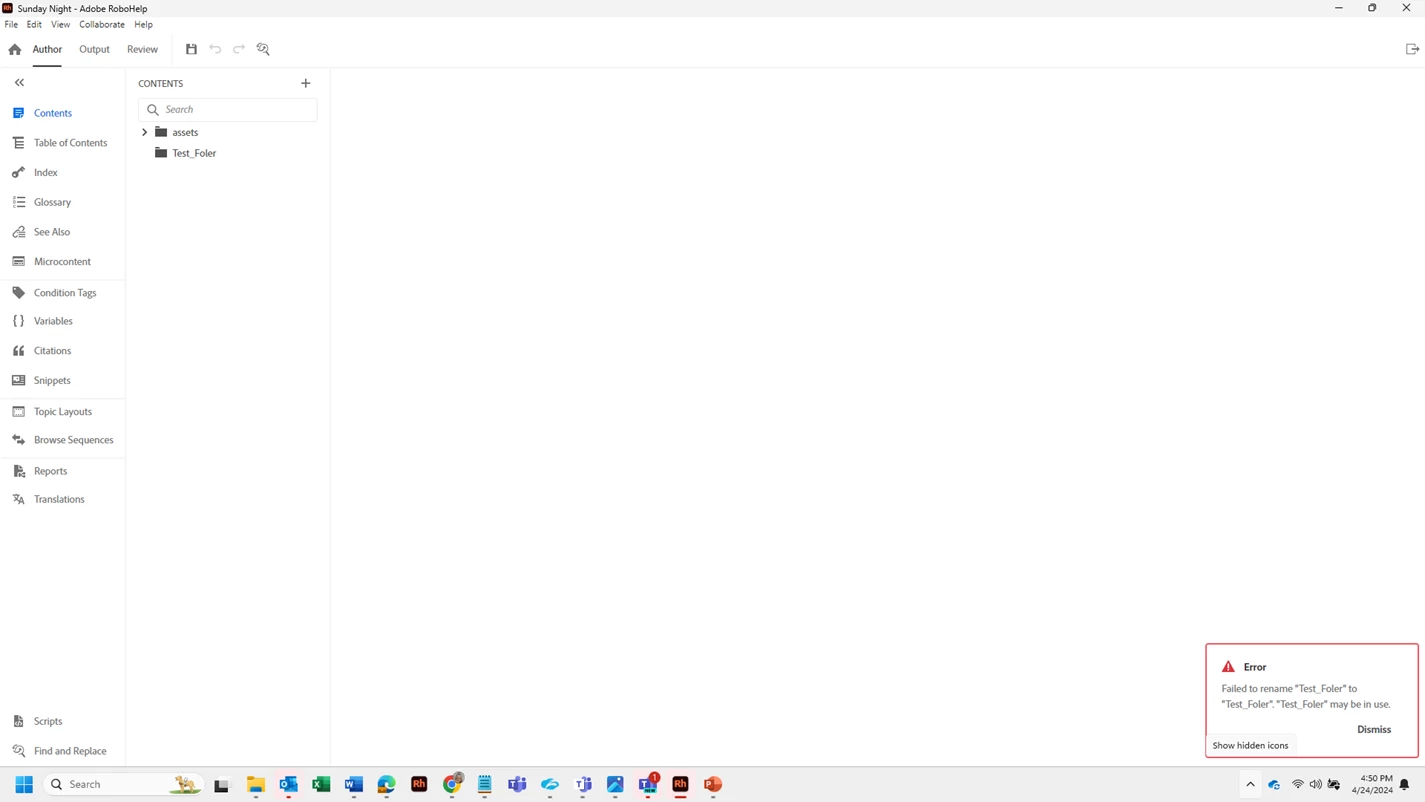
Cannot rename Topic folder in authoring tab of RH 2022

  • April 25, 2024
  • 3 replies
  • 327 views

When I attempt to rename one of my folders in the contents of my project, I get an error message.  I've tried in a new project as well as the project I'm currently working on and I get the same error in the lower right corner and then all of my content disappears from the folder that I just tried to rename.  I have to go to assests folder and create the the folder and name it properly and thank goodness all of my .htm files are still there and then copy those into and copy the files into a different foler and then 
 

    This topic has been closed for replies.

    3 replies

    Known Participant
    August 22, 2024

    Hi. I also keep getting this same error. Have you found a solution? I'll do workarounds, like create a new folder with the desired name then move everything and delete the old. But that gets tiresome. 

    Peter Grainge
    Community Expert
    Community Expert
    August 23, 2024

    @Gina39036576znwo I suggest for this one you need to go to Adobe Support. See https://helpx.adobe.com/contact/enterpriseo-support.other.html#robohelp for your Adobe Support options. The email link tcssup@adobe.com is recommended as it reaches a team dedicated to Technical Communication Suite products including RoboHelp.

    ________________________________________________________

    My site www.grainge.org includes many free Authoring and RoboHelp resources that may be of help.


    Use menu (bottom right) to mark as Best Answer or to Highlight particularly useful replies. Found the answer elsewhere? Share it here.
    Peter Grainge
    Community Expert
    Community Expert
    April 25, 2024

    Can you create a video of you creating a new project through to trying to rename it?


    Is RoboHelp installed to the default folder and was it installed with admin rights. In your case I think the answer will be yes or you would have had other issues. I have to ask though.


    Something has gone wrong as things were working, as opposed to this having been a problem from the start. Have IT changed something?


    Have you rebooted the machine?


    Assuming you have, I would uninstall, reboot and reinstall.


    As to creating a new thread, in this case it would have been OK provided the other thread was 2022. So often we see people say "I'm having the same problem in 2022" when the thread is about 2017. There it is not really the same problem so it's best to start afresh with a link back to the earlier thread. 

    ________________________________________________________

    My site www.grainge.org includes many free Authoring and RoboHelp resources that may be of help.


    Use menu (bottom right) to mark as Best Answer or to Highlight particularly useful replies. Found the answer elsewhere? Share it here.
    Peter Grainge
    Community Expert
    Community Expert
    April 25, 2024

    I have no idea, no one has reported that before to my knowledge.


    What happens in the project I sent you? What happens in the About RoboHelp sample project?


    Have you saved the project before renaming the folder?


    Create a new project and post here the exact steps you take to add the folder and then rename it.

    ________________________________________________________

    My site www.grainge.org includes many free Authoring and RoboHelp resources that may be of help.


    Use menu (bottom right) to mark as Best Answer or to Highlight particularly useful replies. Found the answer elsewhere? Share it here.
    OLDJenniferDONTUSE
    Known Participant
    April 25, 2024

    Hi.  I did all the things you mentioned above yesterday and it happens in all of them.  I saw when I was looking for answers yesterday that one other person had this same question.  It was a 2 part question and I don't beleive it was ever solved and I do believe it was Adobe 2022 (positive it was).  I'll find it and add the link to see if it jogs your memory.  I do remember you responded but there was not a resolution.  I created a new post bc I wasn't sure if it would get any attention if it was inside an older post.  Hope that's ok.