
Inspiring
May 25, 2016
Answered

Cannot use a CSS file to display angle brackets in Responsive HTML output

  • May 25, 2016
  • 1 reply
  • 1136 views

We use a CSS file to add character styles in some of our content. This works OK using WebHelp output, but when we output to Responsive HTML5, angle brackets are not displayed. Here is the code in the CSS file:

span.KeyName {

  font-weight: normal;

  font-variant: small-caps;

}

span.KeyName:before {

  content: "<";

}

span.KeyName:after {

  content: ">";

}

This part of the CSS file should just set the relevant content to small caps, and wrap angle brackets around it. When you look at this style in the Styles dialog, it does not display the angle brackets in the preview window, so perhaps this is a clue to what is causing the problem. We are using RoboHelp version 11, but get the same problem with version 2015. Any advice would be appreciated.
This topic has been closed for replies.
Correct answer Captiv8r

I'm no CSS guru, but I know that the output files are different than the source. My gut tells me that the generation process is causing munging of the CSS in the output. I tested by copying your code and pasting into one of my CSS and applying the style. As you said, WebHelp was fine and the brackets were there but in Responsive they were absent. But when I copied the CSS from the source to the output, the Responsive did actually present the brackets.

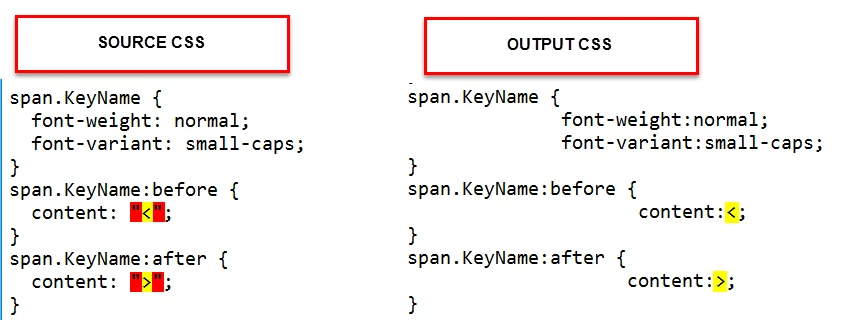
When I compared the differences, what seems to be happening is that in the source CSS there are quotations surrounding the desired characters and in the output the quotations are stripped away. So the workaround seems to be to either simply edit the output CSS after you generate or to just copy the source CSS file over and replace the output with it.

:

Cheers... Rick

1 reply

MDennettiAuthor
Inspiring
May 25, 2016

Sorry, this should read "Responsive HTML5"

Captiv8r
Captiv8rCorrect answer
Legend
May 25, 2016

I'm no CSS guru, but I know that the output files are different than the source. My gut tells me that the generation process is causing munging of the CSS in the output. I tested by copying your code and pasting into one of my CSS and applying the style. As you said, WebHelp was fine and the brackets were there but in Responsive they were absent. But when I copied the CSS from the source to the output, the Responsive did actually present the brackets.

When I compared the differences, what seems to be happening is that in the source CSS there are quotations surrounding the desired characters and in the output the quotations are stripped away. So the workaround seems to be to either simply edit the output CSS after you generate or to just copy the source CSS file over and replace the output with it.

:

Cheers... Rick

MDennettiAuthor
Inspiring
May 25, 2016

Thanks very much for this. Your workaround works perfectly. Does anyone know whythe quotation marks are being stripped away for the HTML5 output, and is there a way to prevent this in RoboHelp?