When you created a bookmark to a topic, this topic should be displayed with > in the contents section:
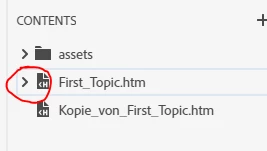
If you click >, the topic unfolds and shows the contained bookmarks.
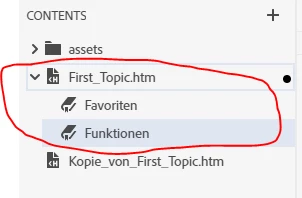
You can now open your other topic, highlight the word you want to use as link and simply drag and drop the desired bookmark onto this word. It will then become a hyperlink. The tooltip should say something like: First_Topic.htm#Funktionen
--> The first part of this link is the topic, the #-part is the bookmark.
It is also possible to highlight the desired word in your topic and click "insert hyperlink". In the dialog that opens, the same Contents section is displayed where you can unfold your bookmarked topic and select the desired bookmark.
My examples show the new UI, but it works similar in RH Classic, it just looks differently.
Hope, this helps




 AdChoices