
Nov 29, 2010 6:21 PM UTC
Question

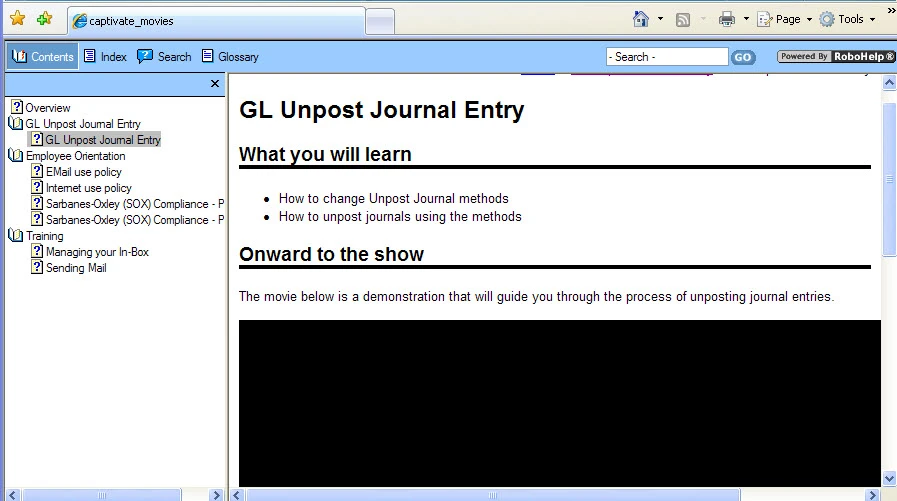
Captivate movie appears as large, black box in RH project

I'm creating a test project where we will have several captivate demonstrations. I chose the "elearning" project type. I already created the captivate movie and published it as a .swf. The preview version works fine in captivate. I have also downloaded flash player 10 (but am still unable to play any .swf files by right-clicking and opening with Flash Player).

I followed the procedure to import the htm file, which subsequently imports the .swf and supporting files. I then inserted the Captivate Demo into my topic. When I preview it from generated Webhelp output (or just using the View Selected Item icon in RH), the entire movie is a big, black box.

What am I doing wrong? Am I publishing from Captivate incorrectly? Am I adding the movie to my topic incorrectly?
This topic is closed to new replies. Start a new post to keep the conversation going.

8 replies

Captiv8r
Legend
Nov 29, 2010 8:14 PM UTC

Hi there

With Captivate 5, a reasonably recent issue has come to light.Basically it involves a situation you encounter if you have upgraded to a certain version of the Flash Player/Plug in and if you are using Text Animations in your Captivate.

See if the link below helps you resolve it.

Click here to view

Cheers... Rick

Helpful and Handy Links

Begin learning Captivate 5 moments from now! $29.95

Captivate Wish Form/Bug Reporting Form

Adobe Certified Captivate Training

SorcererStone Blog

Captivate eBooks

Translate
Nov 29, 2010 8:17 PM UTC

Thank you, Rick. After searching for a couple of hours I did indeed come across the .dll issue with text animation in Captivate.

It is now working fine.

Translate