Inspiring
July 1, 2021
Answered

Change Browser Tab Text

  • July 1, 2021
  • 2 replies
  • 238 views

I am using RoboHelp 2020. When I change to a different TOC item my browser tab text is reading the title of the table of contents. I would like the browser tab to be a specified fixed name, is that possible? I looked for the option to make this chane in Project Settings, as othr posts suggested, however, I do not see any option of adjusting how the browser tab text responds.
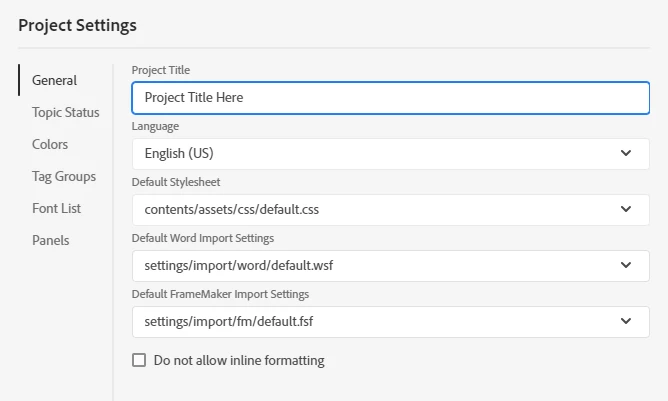


Does anyone know where I can adjust this element?

    This topic has been closed for replies.
    Correct answer Peter Grainge

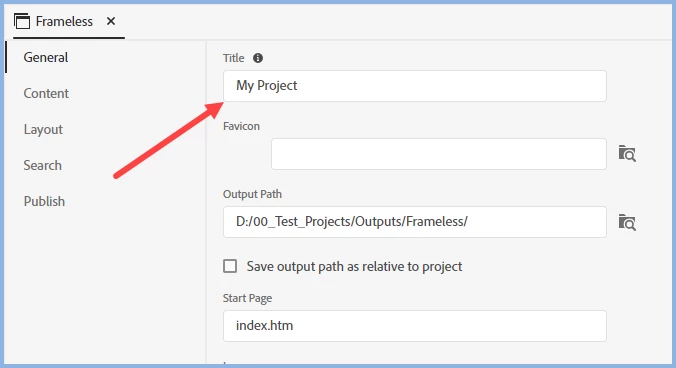
    You change it in the preset


    ________________________________________________________
    See www.grainge.org for free Authoring and RoboHelp Information

    2 replies

    Dean5EA1Author
    Inspiring
    July 1, 2021

    That worked perfectly. I spent so much time not paying attention to that field, becuase I did not know what it did.

    Peter Grainge
    Community Expert
    Peter GraingeCommunity ExpertCorrect answer
    Community Expert
    July 1, 2021

    You change it in the preset


    ________________________________________________________
    See www.grainge.org for free Authoring and RoboHelp Information

    Use the menu (bottom right) to mark the Best Answer or Highlight particularly useful replies. Found the answer elsewhere? Share it here.